
You are here:
Open Types with the File Open Window
You can browse and open your application code and data objects from the Developer Console Open window.
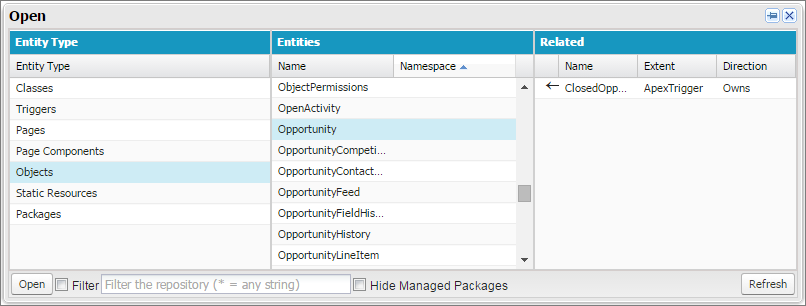
To navigate to an item in the Open window:
- In the Setup Entity Type column, click the type of the item you want to find.
-
In the Entities column, scroll and find the item to examine.
To filter the displayed items, click the Filter text box and enter the filter criteria to match.
-
To see related items in the Related column, click the item once.
For example, click an object to see the Apex classes that use it.
-
To open the item in a new tab, double-click it or select it and click
Open.
Code files open in the Source Code Editor, while data objects open in Object Inspector view.
You can browse and open the contents of packages in your org in the window. You can see the complete contents of packages and open the code files and custom objects contained in a package. You can see package items, such as custom fields and validation rules, in the list, but you can’t view them in detail.

You can’t view or edit the contents of managed packages that you’ve installed in your org. You can browse, open, and edit the classes, objects, and other entities in your installed unmanaged packages as if you had created those entities yourself.
The Packages entity type includes only packages that you’ve created, not managed or unmanaged packages that you’ve installed.
