Configuring the Size and Position of the Guidance Center
Personalize the in-app content experience with options for pinning and unpinning the
Guidance Center panel. The Guidance Center panel also automatically expands for videos and
Trailhead modules, offering more room on the screen for your content.
Required Editions
Available in: Lightning Experience
Available in: Starter, Professional, Enterprise,
Performance, Unlimited, and Developer
Editions
Pinning and Unpinning the Guidance Center
The Guidance Center panel can overlap some elements of the page in Lightning
Experience. To split the screen between the Guidance Center and the Lightning
Experience page, side by side with no overlap, click the pin icon in
the Guidance Center header.
Salesforce remembers a user’s pin selection for the browser and device they’re
on.
Tip Pinning works best on wide screens. If the screen is too narrow, the
Guidance Center can still overlap content on the page even when it’s pinned.
To exit the split view and have the Guidance Center overlap the Lightning Experience
page again, click the unpin icon in the Guidance Center header.
Note If you’re using Enablement programs, the Guidance Center is pinned by
default.
To turn off pinning and unpinning, contact Salesforce Customer Support.
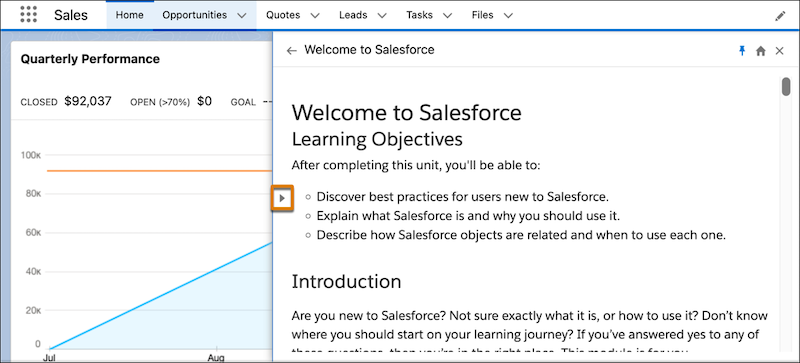
Expanded View for Videos and Trailhead Content
Some content types in the Guidance Center, such as videos or Trailhead units, are
easier to experience when you have more room on the screen. For these content types,
the Guidance Center automatically expands to a larger width.
To resize the Guidance Center after it expands, toggle the arrow icon.
Did this article solve your issue?
Let us know so we can improve!
Loading
Salesforce Help | Article
Cookie Consent Manager
Cookie Consent Manager
General Information
Required Cookies
Functional Cookies
Advertising Cookies
General Information
We use three kinds of cookies on our websites: required, functional, and advertising. You can choose whether functional and advertising cookies apply. Click on the different cookie categories to find out more about each category and to change the default settings.
Privacy Statement
Required Cookies
Always Active
Required cookies are necessary for basic website functionality. Some examples include: session cookies needed to transmit the website, authentication cookies, and security cookies.
Functional Cookies
Functional cookies enhance functions, performance, and services on the website. Some examples include: cookies used to analyze site traffic, cookies used for market research, and cookies used to display advertising that is not directed to a particular individual.
Advertising Cookies
Advertising cookies track activity across websites in order to understand a viewer’s interests, and direct them specific marketing. Some examples include: cookies used for remarketing, or interest-based advertising.