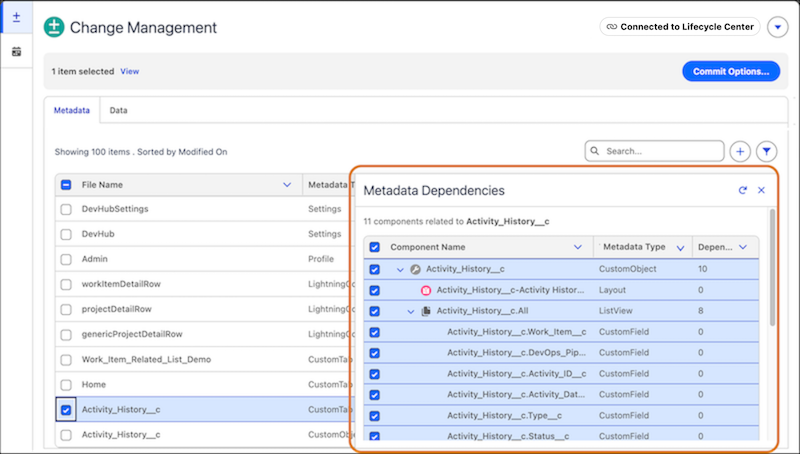
Identify, map, and visualize the relationships between metadata components and data records in your org. You can view dependencies early to select all required metadata and data before deployment, which prevents deployment failures.
Required Editions
Available in: Lightning Experience
Available in: Professional, Enterprise, Performance,
Unlimited, and Developer Editions
When you select a metadata component or data record to deploy, the metadata and data
deployment feature automatically scans your org to identify all metadata-to-metadata and
data-to-data dependencies. The feature identifies data dependencies up to 10 levels, and
metadata dependencies up to 50 levels.
Use the Metadata Dependencies window to plan your deployment in advance by visualizing
relationships between metadata components. To access the window from the Change Management
tab, click the down arrow () icon for a metadata component, then select View
Dependencies.... The window shows metadata relationships in a hierarchical tree.
For details, see Deploy Metadata and Data to a Target Org.
For data-specific dependencies, the feature automatically preselects parent dependencies. You
can also select the parent and child dependencies during the data selection flow.
Project Management App Deployment Example Learn how the metadata and data deployment feature in DX Inspector resolves metadata and data dependencies and preserves record relationships, using a sample app.
We use three kinds of cookies on our websites: required, functional, and advertising. You can choose whether functional and advertising cookies apply. Click on the different cookie categories to find out more about each category and to change the default settings.
Privacy Statement
Required Cookies
Always Active
Required cookies are necessary for basic website functionality. Some examples include: session cookies needed to transmit the website, authentication cookies, and security cookies.
Functional Cookies
Functional cookies enhance functions, performance, and services on the website. Some examples include: cookies used to analyze site traffic, cookies used for market research, and cookies used to display advertising that is not directed to a particular individual.
Advertising Cookies
Advertising cookies track activity across websites in order to understand a viewer’s interests, and direct them specific marketing. Some examples include: cookies used for remarketing, or interest-based advertising.