Configure Interactions in the Lightning App Builder
After you have a custom source component with exposed events in your org, you can assign
event targets and configure the event interactions in the Lightning App Builder.
Required Editions
Available in: Lightning Experience
Available in: Group, Professional, Enterprise,
Performance, Unlimited, and Developer
Editions
User Permissions Needed
To create and save Lightning pages in the Lightning App Builder:
Customize Application
From Setup, in the Quick Find box, enter App Builder, then select
Lightning App Builder.
Edit an existing app page, or click New to create one.
In the Lightning App Builder, add a custom source component to your page.
If you don’t have target components on your page, add those too.
Click the source component on the canvas.
In the properties pane, click the Interactions tab.
Under the desired event, click Add Interaction.
The properties pane changes to show you the interaction details.
Select an interaction.
Currently, the only interaction available is Update Properties.
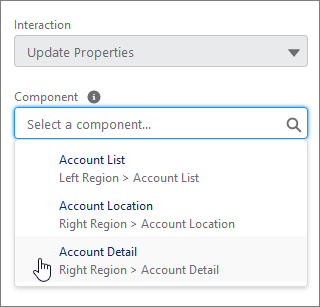
Select the target component for the interaction.
Components are listed with their region location to help you select the correct component
when you work on pages with components spread across multiple regions.
Configure the target component properties.
When you select a target component, its properties appear in the Interaction Details pane.
There you define the value that you want each target property to have when the interaction
happens. If you leave a target property blank, its value remains unchanged when the event
triggers.
Checkbox properties have a No change option. If you’ve
changed the value of a checkbox property, use this option to reset it back to its original
value, and to indicate that you want its value to remain unchanged when the event
triggers.
We use three kinds of cookies on our websites: required, functional, and advertising. You can choose whether functional and advertising cookies apply. Click on the different cookie categories to find out more about each category and to change the default settings.
Privacy Statement
Required Cookies
Always Active
Required cookies are necessary for basic website functionality. Some examples include: session cookies needed to transmit the website, authentication cookies, and security cookies.
Functional Cookies
Functional cookies enhance functions, performance, and services on the website. Some examples include: cookies used to analyze site traffic, cookies used for market research, and cookies used to display advertising that is not directed to a particular individual.
Advertising Cookies
Advertising cookies track activity across websites in order to understand a viewer’s interests, and direct them specific marketing. Some examples include: cookies used for remarketing, or interest-based advertising.