Progress indicators show users where they are in flows. Use the standard progress
indicator for a quick setup, or build a custom component for a tailored experience. To get
started, turn on the progress indicator for a screen flow.
To open, edit, create, activate or
deactivate a flow using all flow types, elements, and features available in Flow
Builder, including Einstein and Agentforce for Flow:
Manage Flow
Note You don't need to be an admin to have the Manage Flow permission.
Ask your admin to add it to your profile or permission set.
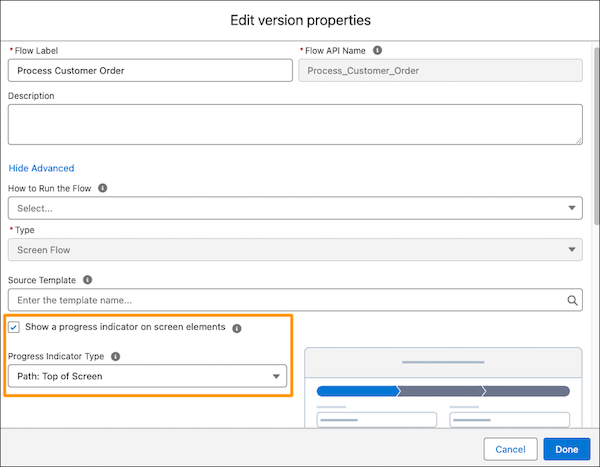
Set up the standard progress indicator to show a user what stage they’re in while
running a screen flow.
The standard progress indicator is enabled by default for new flows. For flows created before
Spring ’25, the standard progress indicator isn’t enabled by default.
In a screen flow in Flow Builder, open the flow’s version properties by clicking .
Expand the Advanced section.
Select Show a progress indicator on screen elements.
Select the progress indicator type.
A preview shows you what the selected progress indicator type looks like.
Click Done.
Using a Custom Progress Indicator
If you want functionality or a design that’s different from the standard progress
indicator, use a custom progress indicator component. You can create a Lightning Web Component
(LWC) and place that LWC on each screen. Or you can put your progress indicator in a custom
component that wraps around the flow using the lightning-flow LWC
Considerations
When you map a stage to a screen component attribute, the flow passes the stage’s label
into the attribute.
The onstatuschange attribute in a standard
lightning-flow component returns the names and labels for the flow’s
active stages and current stage.
We use three kinds of cookies on our websites: required, functional, and advertising. You can choose whether functional and advertising cookies apply. Click on the different cookie categories to find out more about each category and to change the default settings.
Privacy Statement
Required Cookies
Always Active
Required cookies are necessary for basic website functionality. Some examples include: session cookies needed to transmit the website, authentication cookies, and security cookies.
Functional Cookies
Functional cookies enhance functions, performance, and services on the website. Some examples include: cookies used to analyze site traffic, cookies used for market research, and cookies used to display advertising that is not directed to a particular individual.
Advertising Cookies
Advertising cookies track activity across websites in order to understand a viewer’s interests, and direct them specific marketing. Some examples include: cookies used for remarketing, or interest-based advertising.