You are here:
Building Blocks of Flows
Flows are built from three core components: elements, connectors, and resources. Elements represent actions that flows run, such as reading or writing Salesforce data. Connectors define the paths that flows can take at run time. Resources represent values that you can reference throughout a flow.
Required Editions
| View supported editions. |
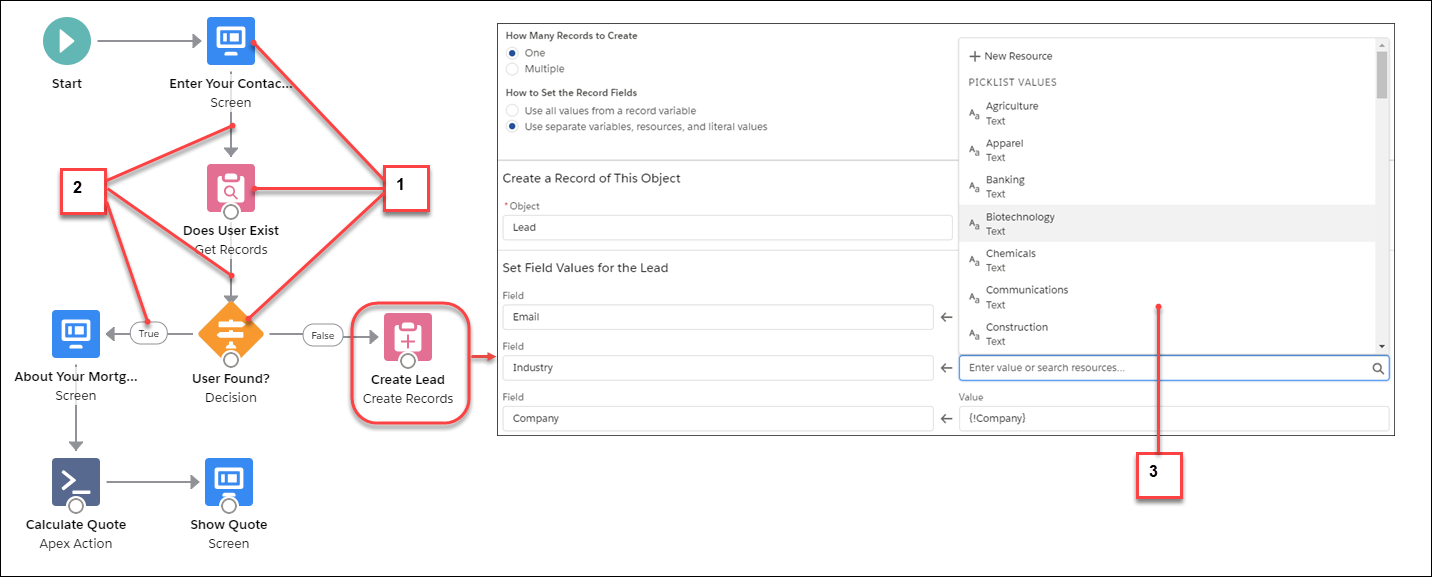
- Each element (1) represents an action that the flow can run. Examples include reading or writing Salesforce data, displaying information to and collecting data from flow users, running logic, or manipulating data.
- Each connector (2) defines an available path that the flow can take at run time.
- Each resource (3) represents a value that you can reference throughout the flow.
When you build a flow in Flow Builder, you work with three main building blocks that come together to create your automation:
Elements
Elements are the actions your flow performs. Think of them as the "doing" parts of your flow. Each element represents a specific task that your flow runs. The most common elements include:
- Screen
- Display information to users and collect their input.
- Create Records
- Add new records to Salesforce.
- Update Records
- Modify existing Salesforce records.
- Get Records
- Retrieve records from Salesforce to use in your flow.
- Delete Records
- Remove records from Salesforce.
- Decision
- Evaluate conditions and direct the flow down different paths.
- Assignment
- Set or change the values of variables and other resources.
- Loop
- Repeat actions for each item in a collection.
For a complete list of all available elements, see Flow Elements.
Connectors
Connectors are the lines that link your elements together. They define the path your flow takes at run time, showing the order in which actions happen. The most common connector types include:
- Standard Connector
- Links one element to the next in sequence.
- Decision Outcome Connectors
- Routes the flow based on whether conditions are met. For example, True and False paths.
- Fault Connector
- Handles errors by directing the flow after an element fails.
- Scheduled Path Connectors
- Triggers actions after a specified time delay or at a scheduled date.
For detailed information about all connector types, see Flow Element Connectors.
Resources
Resources store information that you can use throughout your flow. They act as containers for values you reference, calculate with, or pass between elements. Common resource types include:
- Variable
- Store single values that can change as the flow runs.
- Formula
- Calculate values based on other data.
- Text Template
- Create formatted text for emails or messages.
- Constant
- Store values that never change.
- Choice
- Define options for picklists or radio buttons on screens.
- Record Collection Variable
- Store multiple Salesforce records.
For detailed information about all resource types, see Flow Resources.
By combining these three building blocks—elements to perform actions, connectors to define the sequence, and resources to store data—you can create powerful automations that streamline your business processes.
