Loading
Salesforce now sends email only from verified domains. Read More
Automate Your Business Processes
Table of Contents
Select Filters

          No results
          No results
          Here are some search tips

          Check the spelling of your keywords.
          Use more general search terms.
          Select fewer filters to broaden your search.

          Search all of Salesforce Help
          Flow Bulkification in Transactions

          Flow Bulkification in Transactions

          When a flow runs for multiple records at the same time — such as when you import 100 cases — Salesforce creates one flow interview per record. Bulkification groups similar operations across those interviews so the transaction completes efficiently without hitting governor limits.

          Without bulkification, 100 interviews each performing their own Salesforce Object Query Language (SOQL) queries and Data Manipulation Language (DML) statements can quickly exceed governor limits. Salesforce prevents governor limit failures by automatically grouping operations. When multiple interviews reach the same element, Salesforce batches their operations—one SOQL query instead of 100, or one DML statement instead of 100.

          Salesforce automatically bulkifies operations across interviews. When multiple interviews reach the same element, Salesforce batches their operations rather than running them separately. However, within a single flow's logic, consider the design of your flow — for example, keeping DML operations outside of loops. A Create Records element inside a loop performs one DML operation per iteration, and Salesforce doesn't consolidate them automatically.

          • How Flow Bulkification Works
            Interview operations are bulkified only when they execute the same element. That means that the interviews must all be associated with the same flow.
          • Bulkifiable Flow Elements
            Flows can bulkify any element that performs a DML statement or SOQL query or does something else external to the flow, like sending an email.
          • Example of Flow Bulkification
            This example demonstrates how operations are bulkified for a flow when 100 cases are updated through Data Loader.

          How Flow Bulkification Works

          Interview operations are bulkified only when they execute the same element. That means that the interviews must all be associated with the same flow.

          Required Editions

          View supported editions.

          When multiple interviews for the same flow run in one transaction, each interview runs until it reaches a bulkifiable element. Salesforce takes all the interviews that stopped at the same element and intelligently executes those operations together. If other interviews are at a different element, Salesforce then intelligently executes those operations together. Salesforce repeats this process until all the interviews finish.

          If, despite the bulkification, any interview hits a governor limit, all the interviews in the transaction fail. Any operations that the interviews performed in the transaction are rolled back, and the transaction doesn’t try to perform the operations again. Any operations that access external data aren’t rolled back.

          If an error that isn’t due to a governor limit occurs while executing one of these elements, Salesforce attempts to save all successful record changes in the bulk operation up to three times.

          • Subflow (Create Records and Update Records elements only)
          • Create Records
          • Update Records
          Example
          Example When you upload 100 cases, the flow MyFlow_2 triggers one interview for each case.
          • 50 interviews stop at Create Records element Create_Task_1.
          • The other 50 interviews stop at Create Records element Create_Task_2.

          The result? At least two groups of bulk operations to execute.

          • One for the 50 interviews that execute Create_Task_1
          • One for the 50 interviews that execute Create_Task_2

          Bulkifiable Flow Elements

          Flows can bulkify any element that performs a DML statement or SOQL query or does something else external to the flow, like sending an email.

          Required Editions

          View supported editions.

          Elements that create, update, or delete records

          When a record is created, updated, or deleted, the transaction performs a DML statement.

          • Create Records elements
          • Update Records elements
          • Delete Records elements
          • Quick Action, Post to Chatter, or Submit for Approval core actions
          • Apex Action elements—depending on the specific Apex action

          Elements that look up records

          When fields on a record are looked up, the transaction performs a SOQL query.

          • Get Records elements
          • Update Records elements
          • Delete Records elements
          • Apex Action elements—depending on the specific Apex action

          Elements that send emails

          • Send Email core actions
          • Email Alert elements
          • Apex Action elements—depending on the specific Apex action

          Example of Flow Bulkification

          This example demonstrates how operations are bulkified for a flow when 100 cases are updated through Data Loader.

          Required Editions

          View supported editions.

          The Associated Flow

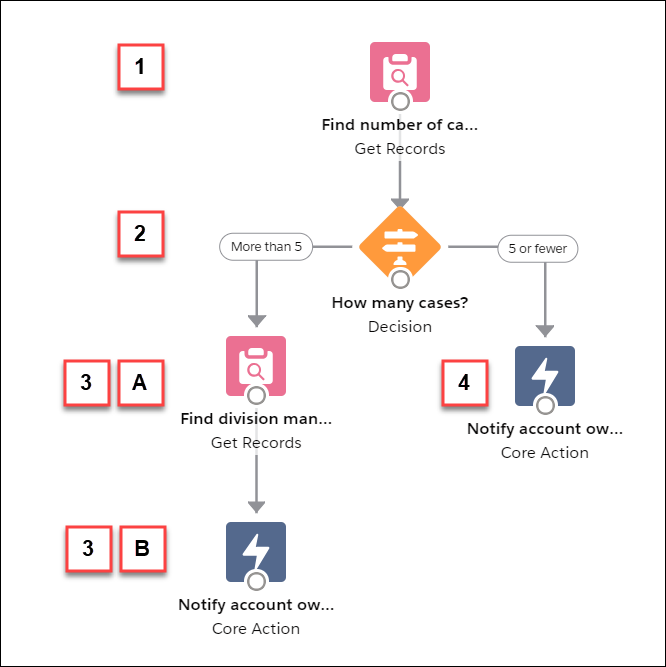
          To better understand, here’s the design of the associated flow.

          Screenshot of example flow

          The flow:

          • Looks up the case’s parent account and how many open cases that account has.
          • Checks whether the account has more than five cases open.
          • If the account has more than five open cases:
            • Looks up the division manager for the account.
            • Posts on the account’s Chatter feed to notify the division manager and the account owner.
          • If the account has five or fewer open cases, posts on the account’s Chatter feed to notify only the account owner.

          The Bulkified Interviews

          When you update the records, one flow interview is created for each case simultaneously. All of the interviews are associated with the same flow. Each interview runs until it gets to a bulkifiable element.

          The first interview goes through the Get Records element (1). Because Get Records can be bulkified, the interview waits there until all the other interviews have done the same. Then, Salesforce executes all the Get Records operations together (because they’re all for the same element in the same flow). Instead of 100 SOQL queries, the transaction issues one SOQL query.

          The Decision element (2) evaluates the first interview. The account has six cases, so the interview is routed down the “More than 5” path. The interview proceeds to the second Get Records element (3a). Because it’s a bulkifiable element, the interview waits there.

          The Decision element (2) evaluates the second interview. This account has one case, so the interview is routed down the “5 or fewer” path. The interview proceeds to the Post to Chatter core action (4). This element is also bulkifiable, so the interview waits there.

          After all the interviews have been processed, 30 are waiting to execute the second Get Records element (3a) and the remaining 70 are waiting to execute the Post to Chatter core action (4).

          Salesforce executes all the Get Records (3a) operations for the first 30 interviews together. Instead of 30 separate SOQL queries, the transaction issues one.

          Next, the transaction returns to the Post to Chatter core action (4), where the 70 interviews are ready to execute their Post to Chatter operations. Remember, the accounts in these interviews don’t have more than five cases. Salesforce executes the Post to Chatter operations together. Instead of 100 separate DML statements to create each Chatter post, the transaction issues one DML statement to create all 100 posts at one time. Because the Post to Chatter core action isn’t connected to a subsequent element, those 70 interviews finish.

          The 30 interviews—which looked up the relevant division manager—proceed to the final Post to Chatter core action (3b). When all 30 interviews are ready, Salesforce executes all 30 Post to Chatter operations together. Instead of issuing 30 separate DML statements for the individual Chatter posts, it issues one. Because the Post to Chatter core action isn’t connected to another element, those 30 interviews finish.

           
          Loading
          Salesforce Help | Article