You are here:
Fix Read-Only Field Errors in Flow
Troubleshoot flows that try to update fields that the running user doesn't have edit permissions for.
Required Editions
| View supported editions. |
If a flow tries to update fields that the running user can’t edit and Filter inaccessible fields from flow requests is not enabled for your org, the flow fails. If your record variable includes read-only fields and you can’t grant your running users “Edit” permissions for those fields, remove the fields from the record variable. Set the field values individually in a Create Records or Update Records element or copy the writable field values into a new record variable.

Copy Field Values from One Record Variable to Another
Record variables and record collection variables can have values set for fields that the running user can’t edit. However, you can use the writable values to create or update records with Create Records or Update Records elements. To do so, map the writable values from the original record variable into a new record variable.
Required Editions
| View supported editions. |
| User Permissions Needed | |
|---|---|
| To open, edit, create, activate or deactivate a flow using all flow types, elements, and features available in Flow Builder, including Einstein and Agentforce for Flow: | Manage Flow |
- Add an Assignment element to your flow. Make sure that the flow runs this element after the original record variable has been populated but before the Create or Update element.
-
For each writable field in the original record variable, add a row.
Variable—Select {!recordVar2.field}, where recordVar2 is the name of the new variable and field is the field on that variable.
Operator—Select equals.
Value—Select {!recordVar1.field}, where recordVar1 is the name of the original variable and field is the field on that variable.
Note If you plan to reference the variable in an Update Records element, include the record’s ID in the new record variable. Although Id is read only, the flow uses the value to determine which records to update.

You have a case record variable called {!myCaseVar_all}. It stores values for some read-only fields, so you can’t use it in an Update Records element. Copy the fields that you want to update to a new record variable: IsEscalated and Status. Also, copy Id because it’s required for an update operation. Here’s what those assignment rules look like.
| Variable | Operator | Value |
|---|---|---|
| {!myCaseVar_final.Id} | equals | {!myCaseVar_original.Id} |
| {!myCaseVar_final.IsEscalated} | equals | {!myCaseVar_original.IsEscalated} |
| {!myCaseVar_final.Status} | equals | {!myCaseVar_original.Status} |
The same example works for a record collection variable. However, because you can’t directly change the values of a collection variable, you use a loop. After the flow has iterated over every item in the original collection, it exits the loop.
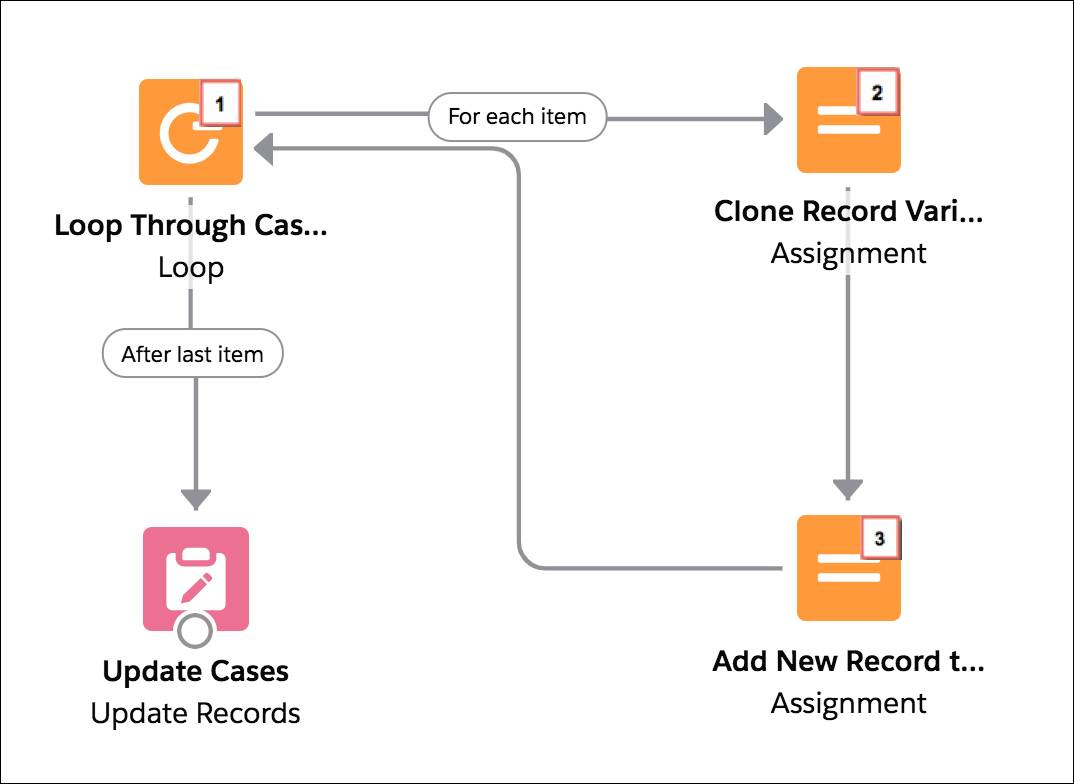
- Using a Loop element, the flow passes each item’s values into a loop variable ({!myCaseLoopVar_original}).
- For each iteration, an Assignment element copies the Id, IsEscalated, and Status fields from the loop variable to another record variable ({!myCaseLoopVar_final}).
- The flow then adds the {!myCaseLoopVar_final} variable’s values to
a new collection. The second Assignment element includes this assignment rule.
Variable Operator Value {!myCaseColl_updated} add {!myCaseLoopVar_final}
