You are here:
Copy Quip Content Action (Retired)
Copy content from a source slide deck, and paste it in a target slide.
Required Editions
| Available in: Lightning Experience |
| View supported editions for Quip. |

Warning Quip is retiring slides on January
31, 2021. After this date, the Copy Content action in Process Builder and Flow Builder no longer
works, and Slides isn’t a valid document type for the Edit Document and Create Document actions.
Tell Me More
Drag a Core Action element onto the canvas. In the Core Action field, enter Quip, and select Copy Quip Content.
Set Input Values
Use values from earlier in the flow to set the inputs for the action.
| Input Parameter | Description |
|---|---|
| Document Type | Type of document you want to copy. Valid values are:
|
| Source Document URL | URL of the slide deck you want to copy content from. |
| Target Document URL | URL of the slide deck where you want to add copied content. |
| Slide Count Range | Optional. Number of slides to copy from the source slide deck. By default, Slide Count Range is set to 1. |
| Source Section Anchor Link | URL of a section in the source slide deck that you want to copy content from. |
| Source Slide Number | Optional. The slide index to copy content from. For example, to copy content from the first slide of a deck, enter 1. |
| Target Record ID | Optional. ID of the record you want to use in the place of mail merge syntax. For example, to replace the copied document’s [[Account.Name] merge field with the record’s account name, enter the record ID. |
| Target Section Anchor Link | URL of a section in the target slide deck where you want to paste copied content. |
| Target Slide Number | Optional. The slide index to copy content to. For example, to paste copied content to the first slide of a deck, enter 1. |
Store Output Values
| Output Parameter | Description |
|---|---|
| Document ID | ID of the target slide deck content was copied to. |
| Document Link | URL of the target slide deck content was copied to. |
| Created Document Title | The title of the slide deck content was copied to. Only string values are supported. |

Example A sales rep wants to update a slide deck with the latest sales numbers to prepare for a
customer pitch. The sales rep wants to use the slides from another deck that their manager keeps
up to date with the latest numbers. You can create a flow that uses the Copy Quip Content core
action to copy content slides 1 and 2 from their manager’s slide deck and replace the content in
slides 3 and 4 of the customer-facing slide deck.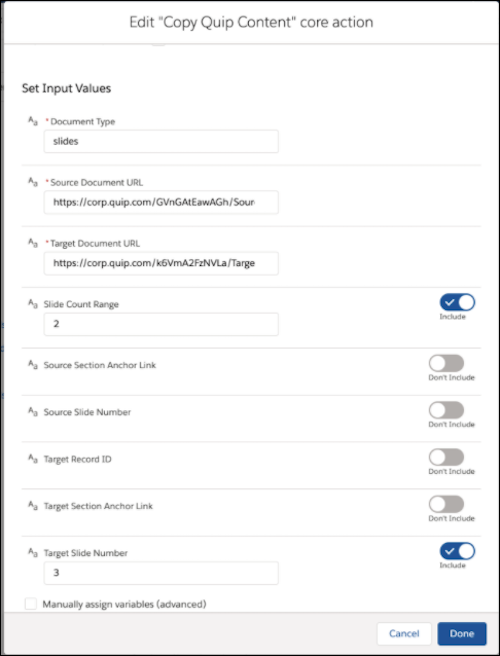
Did this article solve your issue?
Let us know so we can improve!
