You are here:
Copy Quip Document Action
To use a document as a template, create a copy. By default, copied documents are added to the running user’s Private folder in Quip.
Required Editions
| Available in: Lightning Experience |
| View supported editions for Quip. |
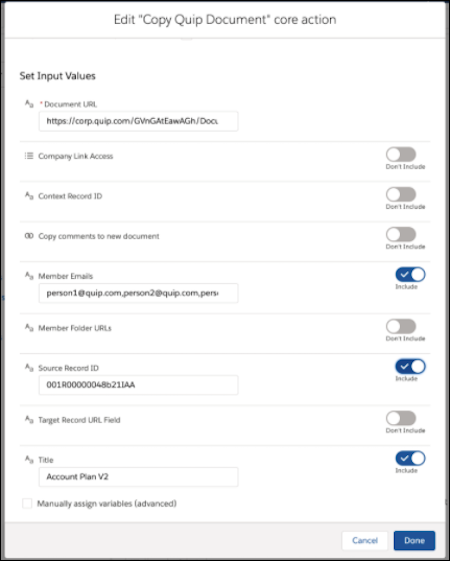
In Flow Builder, add an Action element to your flow. In the Action field, enter Quip, and select Copy Quip Document.

Set Input Values
Use values from earlier in the flow to set the inputs for the action.
| Input Parameter | Description |
|---|---|
| Document URL | The URL of the document that you want to copy. For example: https://salesforce.quip.com/GVnGbtEasAGa |
| Company Link Access | Optional. Link sharing settings for the copied document. By default, copied documents are set to edit-access. Valid values are:
|
| Context Record ID | Optional. ID of the record that you want to update with the copied document’s URL. Including the Context Record ID doesn’t attach the document to a record. Valid only if the Quip Document component is set up on the record layout. The Target Record URL Field is required to use Context Record ID. |
| Copy comments to new document | Optional. This input determines whether to copy comments from the source document to the copied document. Valid values are:
|
| Member Emails | Optional. A list of user emails separated by commas to add to the copied document. Valid values are:
|
| Member Folder URLs | Optional. A list of folder URLs separated by commas to add the copied document to. Valid values are:
For example: https://salesforce.quip.com/folder/account-plans |
| Source Record ID | Optional. ID of the record that you want to use in the place of mail merge
syntax. For example, to replace the copied document’s Account.Name merge field with the record’s account name, enter the
record ID. |
| Target Record URL Field | Optional. Reference to the URL field on a record used by the Context Record ID. This field is updated with the copied document URL and adds the copied document to the record’s Quip Document component. Valid values are:
The Context Record ID is required to use the Target Record URL Field. Including the Target Record URL Field doesn’t attach the newly created document to the record. |
| Title | Optional. The title of the copied document. Only string values are supported. |
Store Output Values
| Output Parameter | Description |
|---|---|
| Created Document Title | The title of the copied document. |
| Document ID | ID of the copied document. |
| Document Link | The URL of the copied document. |

 Watch an Account Plan Automation Demo
(2 minutes)
Watch an Account Plan Automation Demo
(2 minutes)
A sales rep wants to create an Account Plan and share it with the regional sales managers to close a large opportunity. You can create a flow that uses the Copy Quip Document core action to copy an Account Plan template when the Opportunity stage is set to Proposal/Quote. Configure the action to replace merge fields with data from the account, add the Account Plan to a folder, and share the folder with the regional sales managers.