You are here:
Create Quip Document Action
Create a document, spreadsheet, or slide deck, and add content to it.
Required Editions

| Available in: Lightning Experience |
| View supported editions for Quip. |
In Flow Builder, add an Action element to your flow. In the Action field, enter Quip, and select Create Quip Document.
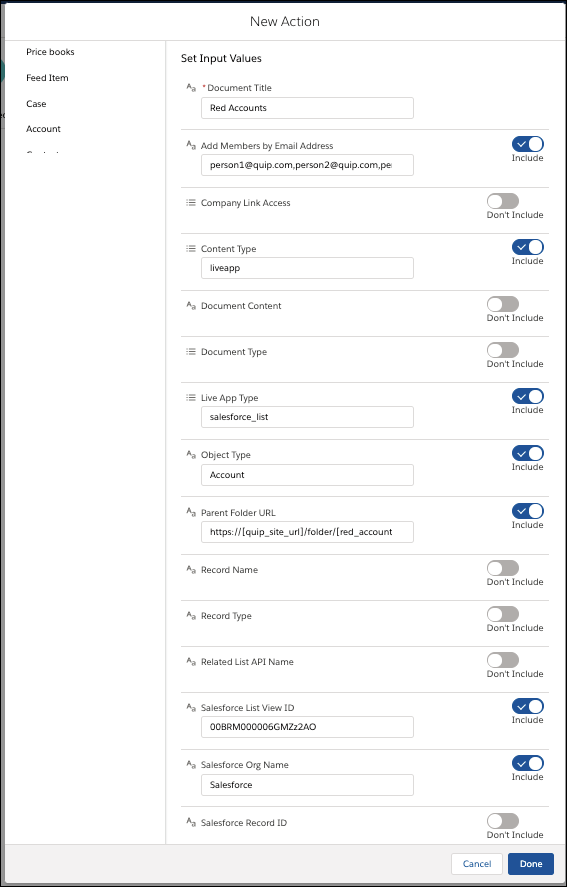
Set Input Values
Use values from earlier in the flow to set the inputs for the action.
| Input Parameter | Description |
|---|---|
| Document Title | The title of the new document. Only string values are supported. |
| Add Members by Email Address | Optional. A list of user emails separated by commas to add to the new document. Valid values are:
|
| Company Link Address | Optional. Link sharing settings for the new document. By default, new documents are set to edit-access. Valid values are:
|
| Content Type | Optional. Format of content added to the document. By default, content format is set to html. Valid values are:
|
| Document Content | Optional. Content added to the new document. Valid only when Content Type is set to html. By default, the document title is used for the document’s content. Valid values are:
|
| Document Type | Optional. Type of document created including documents and spreadsheets. By default, new documents are created as documents. Valid values are:
|
| Live App Type | Type of live app added to the document. Required if Content Type is set to liveapp. Only documents support live apps. Valid values are:
|
| Object Type | Type of object used by the Salesforce List live app. Required if Live App Type is set to salesforce_list. Only string values are supported. For example: Account, Opportunity, or CustomObject__c. |
| Parent Folder URL | Optional. A list of Quip folder URLs separated by commas to add the new document to. By default, the document is added to the user’s Private folder in Quip. Valid values are:
For example: https://salesforce.quip.com/folder/account-plans |
| Record Name | Optional. Name of the record added to the document through the Salesforce Record live app. Valid only if the Live App Type is set to salesforce_record. Only string values are supported. |
| Record Type | Optional. Type of object used by the Salesforce Record live app. Valid only if Live App Type is set to salesforce_record. Only string values are supported. For example: Account, Opportunity, or CustomObject__c. |
| Salesforce List View ID | ID of the Salesforce list view added to the document. Required if Live App Type is set to salesforce_list. |
| Salesforce Org Name | Optional. Salesforce org name used in the live app. Valid only if Content Type is set to liveapp. Only string values are supported. For example: Acme. |
| Salesforce Record ID | ID of the Salesforce record added to the document. Required if Live App Type is set to salesforce_record. |
Store Output Values
| Output Parameter | Description |
|---|---|
| Document Title | Title of the new document |
| Document ID | ID of the new document |
| Document Link | URL of the new document |