You are here:
Einstein Decision Marketing Flow Element
Determine a user’s level of email engagement by using Einstein Engagement Frequency or Einstein Engagement Scoring. You can also route users through the flow based on that engagement level. This element performs the equivalent of an if-then statement.
Required Editions
| Available in: Lightning Experience |
| This feature is available in Enterprise and Unlimited Editions with Marketing Cloud Growth or Advanced Edition. |
| Available in: All Editions supported by Data 360. See Data 360 edition availability. |
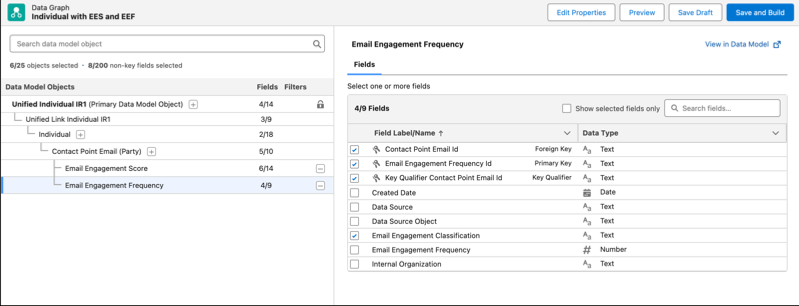
The data graph associated with the flow must match the data graph select in Setup and meet these requirements at a minimum. The data graph can include other objects and attributes.
- The primary DMO of the data graph is Unified Individual.
- The Unified Individual DMO in the data graph includes the Individual Identity Link DMO as a related object.
- The Individual Identity Link DMO in the data graph includes the Individual DMO as a related object.
- The Individual DMO in the data graph includes the Contact Point Email DMO as a related object.
- If you’re using the Einstein Engagement Scoring model, the Contact Point Email DMO in the data graph must include the Einstein Engagement Score DMO as a related object. In the Einstein Engagement Score DMO, you must select the attributes that correspond to the engagement metrics that you use in Flow Builder, for example, Email Click Likelihood, Email Open Likelihood, and Email Subscribe Likelihood.
- If you’re using the Einstein Engagement Frequency model, the Contact Point Email DMO in the data graph must include the Einstein Engagement Frequency DMO as a related object. In the Einstein Engagement Score DMO, you must select the Email Engagement Classification attribute.
Usage
The Einstein Decision action element is available in automation event-triggered flows, broadcast flows, on-demand flows, and segment-triggered flows.
Set Input Values
| Input Parameter | Description |
|---|---|
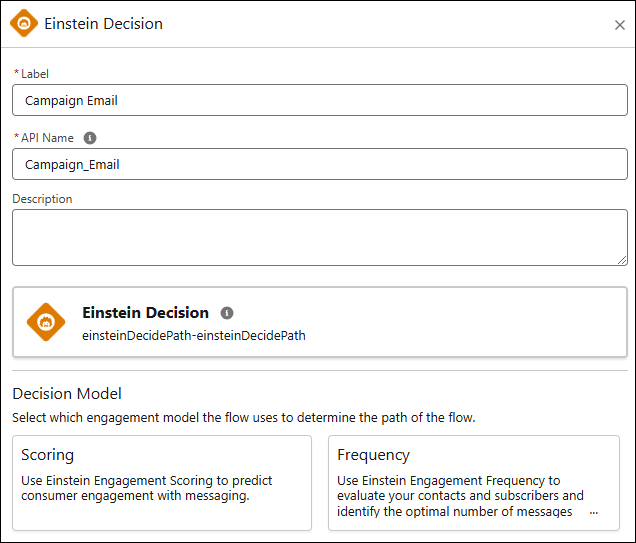
| Label | The label for this element on the canvas. |
| API Name | The requirement for uniqueness applies only to elements within the current flow. Two elements can have the same API name, provided they're used in different flows. An API name can include underscores and alphanumeric characters without spaces. It must begin with a letter and can’t end with an underscore. It also can’t have two consecutive underscores. |
| Description | Description of this element. |
Select Decision Model
Select which engagement model the flow uses to determine the flow’s path.
- Scoring: Einstein Engagement Scoring uses customer data and machine learning to assign scores for each contact's likelihood to engage with emails or to interact with push notifications. To use Einstein Engagement Scoring, turn it on in your org and make sure that the Einstein Engagement Score data model object (DMO) is included in the data graph associated with the flow.
- Frequency: Einstein Engagement Frequency evaluates users and determines the optimal number of email messages to send. To use Einstein Engagement Frequency, turn it on in your org and make sure that the Einstein Engagement Frequency DMO is included in the data graph associated with the flow.
Scoring Configuration
If you select Einstein Engagement Scoring as the engagement model, select the metric that the flow uses to determine each user’s path.
- Open Likelihood: Select paths based on how likely the customer is to open a message.
- Click Likelihood: Select paths based on how likely the customer is to click a link in a message.
- Unsubscribe Likelihood: Select paths based on how likely the customer is to unsubscribe from your list.
Then, add up to four paths. You must add at least one path.
- Most likely: The user has the highest likelihood of engaging. For example, the user has the highest likelihood of clicking a link in an email.
- More likely: The user has an above-average likelihood of engaging.
- Less likely: The user has a below average likelihood of engaging.
- Least likely: The user has the least likelihood of engaging.
Frequency Configuration
If you select Einstein Engagement Frequency as the engagement model, you can add up to four paths. You must add at least one path.
- Oversaturated: The user has received too many messages.
- Almost Saturated: The user has received nearly too many messages.
- On Target: The user has received the right number of messages.
- Overlooked: The user has received too few messages.
