You are here:
Recommendation Assignment Element
Generate Einstein Next Best Action recommendations by combining data from records in the recommendation object, records in other objects, values in collections, and manually entered values.
Required Editions
The Recommendation Assignment element is similar to the Assignment element: both set values in variables. However, there are important differences:
- Use Recommendation Assignment to output a new recommendation collection variable. In contrast, use Assignment to add or change values in an existing variable.
- Recommendation Assignment can’t update values in existing variables.
- Recommendation Assignment can set a field’s value across all recommendations in the output collection. For example, if you set the AcceptanceLabel to Accept, the AcceptanceLabel for all records in the output collection is set to Accept.
- Recommendation Assignment can create recommendations from another object’s records. For example, use leads in the source collection to create recommendations that have the same names as those leads.
- Recommendation Assignment is available only in Recommendation Strategy flows.
Set Source Collection
Select a record collection variable with the data that you want to use to create recommendations. Recommendation Assignment creates one recommendation for every record in the source collection.
If you select a record collection variable that contains recommendations, you can choose the fields that set values in the target collection. If you select a record collection variable that contains any other object’s records, the element requires certain recommendation fields.
Set Target Collection Values
Assign values to recommendation fields in the output recommendation collection. Values defined in this section are set in every record in the output collection. If there are values in the source collection variable that aren’t set here, those values are passed to the output recommendation collection.
To use the source collection records’ values from a specific field, select currentItemFromSourceCollection in the Value column, then select the desired field.
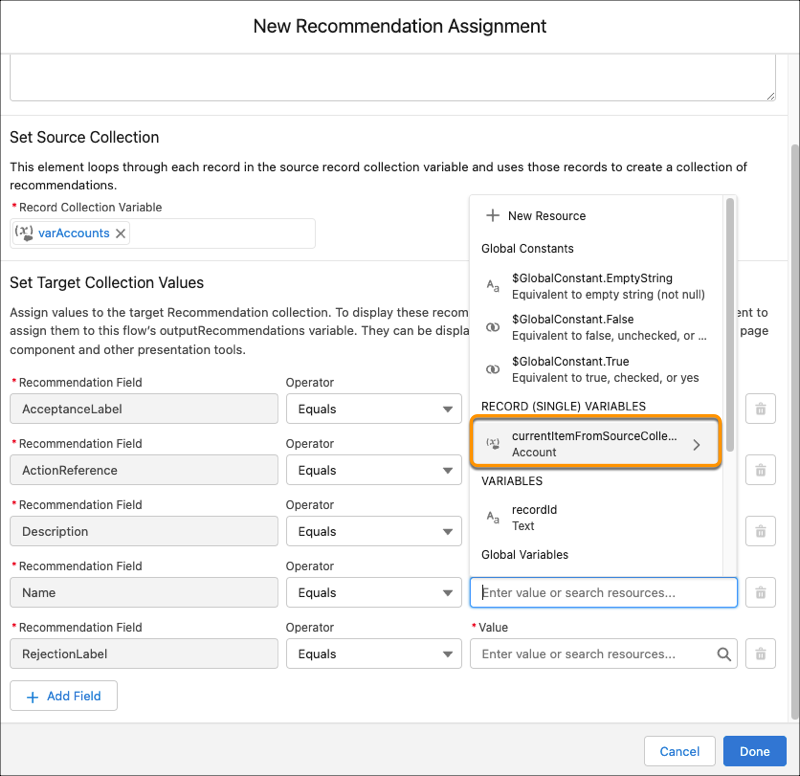
Each value is modified by the operator and value combination.
| Column Header | Description |
|---|---|
| Recommendation Field | The recommendation field whose value you want to change. Select an existing field. |
| Operator | Select Equals to set the value in a field. Select Add to add the text that you enter or select for Value to the end of Recommendation Field. |
| Value | Recommendation Field and Value in the same row must have compatible data types. Options: |
Einstein Next Best Action always requires certain recommendation fields to display a recommendation. However, the Recommendation Assignment element only requires these fields if you select a source collection that contains non-recommendation records. If you select a source collection with recommendations, Recommendation Assignment doesn’t require the fields because it’s possible that your source collection already has values in those fields. However, the fields are still required to display the recommendation.
- AcceptanceLabel
- ActionReference
- Description
- Name
- RejectionLabel
Usage
Recommendation Assignment outputs a collection with the assembled recommendation records and doesn’t change the contents of the source collection. The output collection is null until its corresponding Recommendation Assignment element runs.

However, recommendations display to users only if they’re in the outputRecommendations variable. To add recommendations to the outputRecommendations collection, use an Assignment element.
