You are here:
Wait for Amount of Time Element
Resume a flow interview after a specific amount of time.
Required Editions
| View supported editions. |

Note
- Flows that contain Wait elements must be autolaunched.
- If a flow includes Wait elements and screens, choice, or choice sets, you can’t activate or run it.
- Before you add a Wait element to your flow, understand the special behavior and limitations. Learn more in Paused Flow Interview Considerations
- Flow Builder saves your expand and collapse preferences for this element locally in your browser, and this setting does not affect other users’ view. If you clear your browser's site data or use a different browser, your preferences reset to the default expanded view.
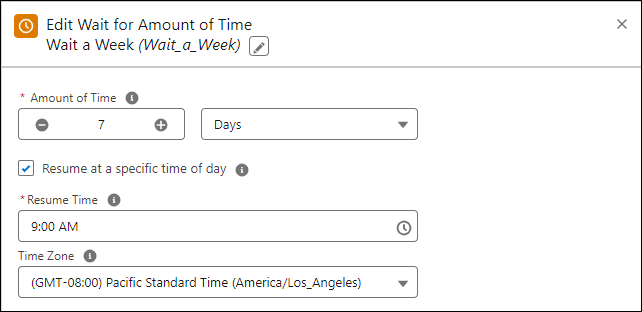
| Field | Description |
|---|---|
| Amount of Time | How long to wait until resuming the flow. |
| Resume at a specific time of day | Specifies whether to wait to resume a flow until a specific time of day. When enabled, if the specified amount of time expires after the resume time, the flow doesn’t resume until the resume time on the following day. |
| Resume Time | When to resume the flow. |
| Time Zone | The time zone used to resume the flow. |
Did this article solve your issue?
Let us know so we can improve!
