You are here:
Wait Until Date Element
Resume a flow at a specific date and time.
Required Editions
| View supported editions. |

- Flows that contain Wait elements must be autolaunched.
- If a flow includes Wait elements and screens, choice, or choice sets, you can’t activate or run it.
- Before you add a Wait element to your flow, understand the special behavior and limitations. Learn more in Paused Flow Interview Considerations
- Flow Builder saves your expand and collapse preferences for this element locally in your browser, and this setting does not affect other users’ view. If you clear your browser's site data or use a different browser, your preferences reset to the default expanded view.
Specify a Calendar Date and Time
To resume a flow at calendar date and time, select Enter Date. For example, you can resume a flow ahead of a peak selling period for your business.
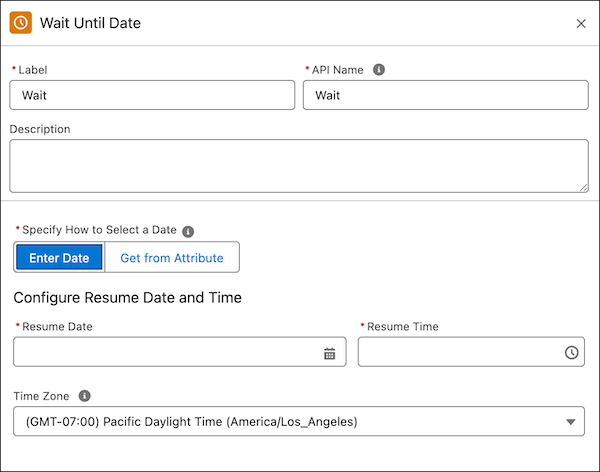
| Field | Description |
|---|---|
| Resume Date | The date to resume the flow. |
| Resume Time | The time to resume the flow. |
| Time Zone | The time zone used to resume the flow. |
If you specify no resume rime or time zone, the flow resumes at 12 AM in your org's time zone. If you specify a resume time and no time zone, the flow resumes at the specified time in your org’s time zone.
Get from Attribute
To resume a flow at a record attribute’s date or datetime value, select Get from Attribute. For example, you can resume a flow before a customer’s contract renewal date.
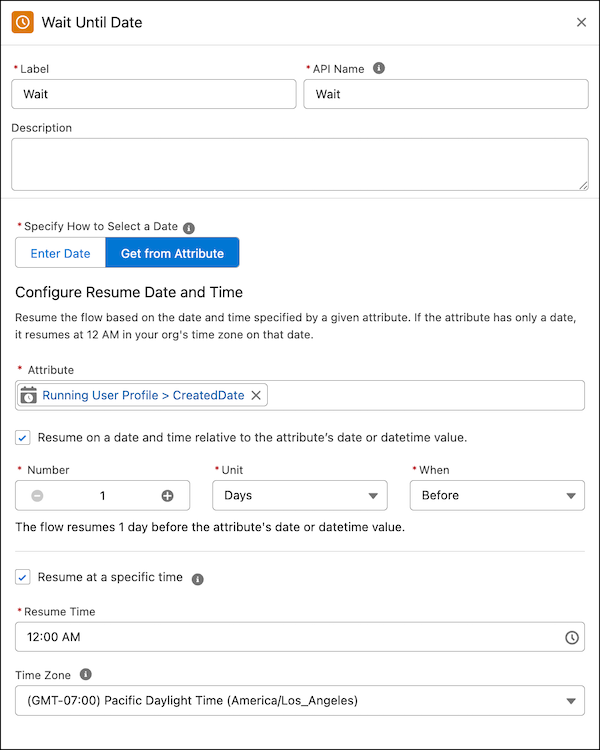
To resume at a time relative to the attribute’s date or datetime value, select Resume on a date and time relative to the field’s date or datetime value.
To resume at a specific time of day, select Resume at a specific time of day. An attribute with only a date will resume the flow at 12 AM in your org's time zone on that date.
| Field | Description |
|---|---|
| Attribute | The attribute with the date or datetime value used to resume the flow. |
| Number | The number of units used to resume the flow. For example, 2. |
| Unit | The unit of time used to resume the flow. For example, days. |
| When | The relative timing used to resume the flow. For example, before. |
| Resume Time | The time to resume the flow. |
| Time Zone | The time zone used to resume the flow. |
