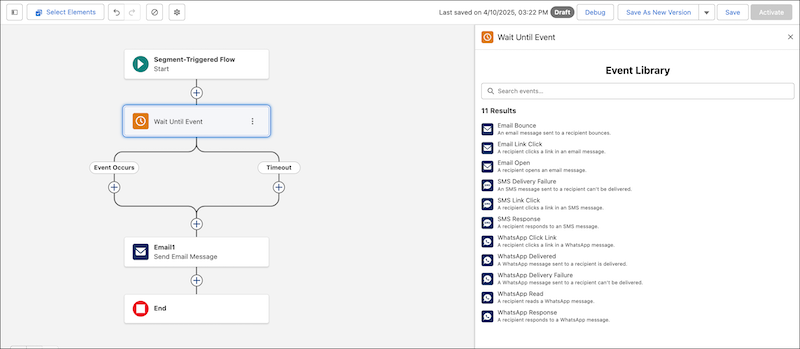
Resume a flow interview after an engagement event. Select a standard event, such as
Email Link Click or SMS Response, or use a custom engagement signal.
Required Editions
Available in: Lightning Experience
This feature is available in Enterprise and Unlimited Editions with
Marketing Cloud Growth or Advanced Edition.
Note To accurately track a messaging engagement event's outcome, such as Email Link Click,
you must add the Wait Until Event element immediately after the element that the flow pauses
until the event occurs.
Note For events that involve link clicks, dynamic links and links with merge fields are
unsupported. As an alternative, use the Any Link option to resume after any link is
clicked.
Set Input Values
Field
Description
Object
The object to monitor for engagements
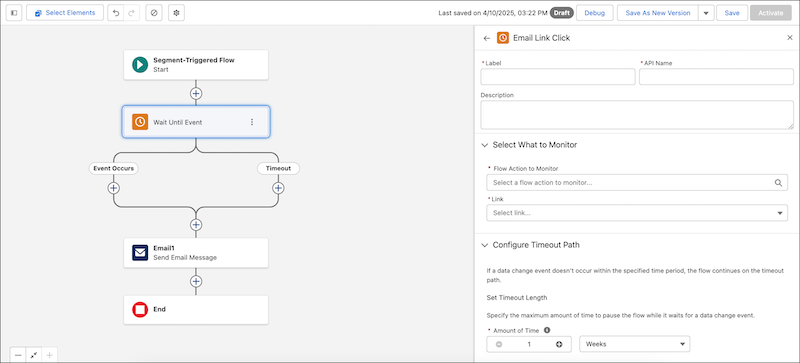
Flow Action to Monitor
The flow action to monitor for engagements
Content Interaction
The kind of engagement that resumes the flow
Amount of Time
The maximum amount of time to wait. If the duration is exceeded, the flow
resumes and follows a timeout path.
We use three kinds of cookies on our websites: required, functional, and advertising. You can choose whether functional and advertising cookies apply. Click on the different cookie categories to find out more about each category and to change the default settings.
Privacy Statement
Required Cookies
Always Active
Required cookies are necessary for basic website functionality. Some examples include: session cookies needed to transmit the website, authentication cookies, and security cookies.
Functional Cookies
Functional cookies enhance functions, performance, and services on the website. Some examples include: cookies used to analyze site traffic, cookies used for market research, and cookies used to display advertising that is not directed to a particular individual.
Advertising Cookies
Advertising cookies track activity across websites in order to understand a viewer’s interests, and direct them specific marketing. Some examples include: cookies used for remarketing, or interest-based advertising.