You are here:
Picklist Choice Set Resource
Generate a set of choices using the values of a picklist or multi-select picklist field.
Required Editions
| View supported editions. |
| Field | Description |
|---|---|
| API Name | The requirement for uniqueness applies only to elements within the current flow. Two elements can have the same API name, provided they're used in different flows. An API name can include underscores and alphanumeric characters without spaces. It must begin with a letter and can’t end with an underscore. It also can’t have two consecutive underscores. |
| Description | Helps you differentiate this resource from other resources. |
| Object | The object whose fields you want to select from. You can’t change the object for a previously saved picklist choice set. |
| Data Type | Determines whether you can choose from picklist fields or multi-select picklist fields. You can’t change the data type of a previously saved picklist choice set. |
| Field | The picklist or multi-select picklist field to use to generate the list of choices. |
| Sort Order | Controls the order that the choices appear in. The choices sort based on the translated picklist value for the running user’s language. |

In a flow that simplifies the process of creating an account, users identify the company’s industry.
Rather than creating one choice for each industry, you add a picklist choice set to the flow and populate a Picklist screen component with it. When a user runs the flow, the picklist choice set finds all the values in the database for the Industry field (1) on the Account object (2).
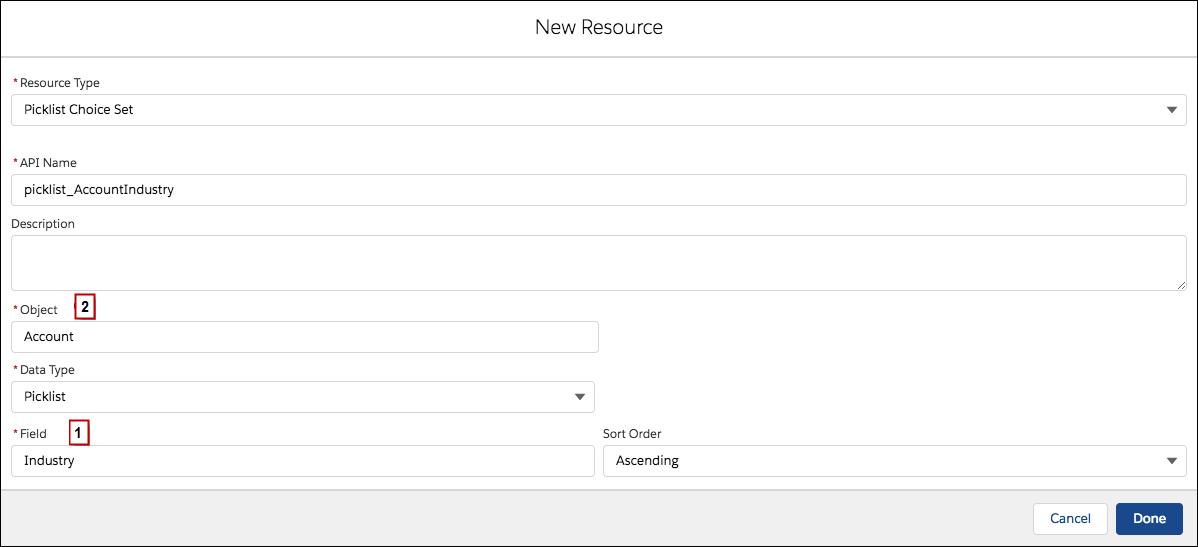
In addition to being easier than the standalone choice resource to configure, a picklist choice set reduces maintenance. When someone adds options to the Account Industry field, the flow automatically reflects the changes. You don’t have to manually update the flow.
Considerations
You can’t do the following when using a picklist choice set.
- Filter out values that come back from the database. The flow always displays every picklist value for the field, even if you’re using record types to narrow down the picklist choices in page layouts.
- Customize the label for each option. The flow always displays the label for each picklist value.
- Customize the stored value for each option. The flow always stores the API value for each picklist value.
Picklists for Knowledge Articles aren’t supported.
Can't find a standard picklist field in a picklist choice set? It's often because that field's data type isn't technically a picklist. To verify a field's true data type, check the Object Reference for the Saleforce Platform. For example, the Event object's Subject field doesn't appear when you're creating a picklist choice set, even though Object Manager lists it as a picklist. To display these values in your flow, you can use a record choice set to find and select records by the field's value. Or, you can manually create options like Email, Meeting, or Call with a Choice resource.
Labels and Values for Translated Fields
When a picklist field has been translated:
- Each choice’s label uses the version of the picklist value in the running user’s language.
- Each choice’s stored value uses the version of the picklist value in the org’s default language.
