
You are here:
Custom Lightning Types Overview
Learn about custom Lightning types, the benefits they provide, and how field mapping works.
Required Editions
| Available in: Lightning Experience |
| Available in: Enterprise, Performance, Unlimited, and Developer Editions. |
When to Use Custom Lightning Types
When a standard interface doesn’t meet your business needs, you can override the default UI by using your custom Lightning Web Component (LWC) to create a customized experience. Custom Lightning types are particularly effective for handling complex data structures and UI requirements.
Key Parts of a Lightning Type
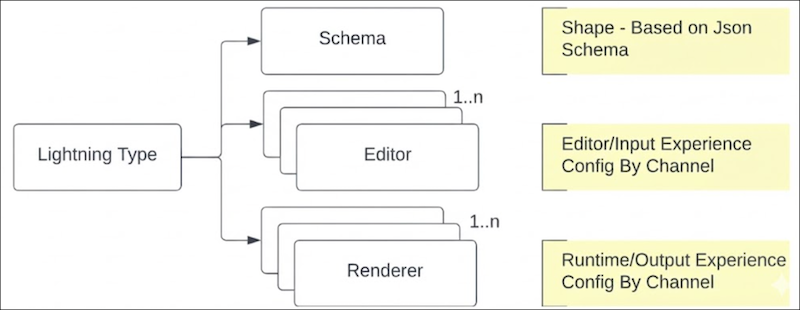
Each Lightning type consists of three main parts.
- Schema: defines the structure of your data and its validation rules, such as type, format, and maximum length
- Editor: controls the UI for entering or editing information
- Renderer: controls the UI for displaying information as output
Categories of Custom Lightning Types
Custom Lightning types fall into two categories based on how you define their schema.
- Apex-based custom Lightning types. Use these types when you define the schema by referencing an Apex class. This method is for when you have a complex data structure already defined in an Apex class code. These types can be used for Agentforce Employee agents in Lightning Experience, Agentforce Service agents through Enhanced Chat v2, Agentforce Employee agents on Mobile, and Agentforce Service agents via Enhanced Chat v2 on Mobile.
- Object-based custom Lightning types. Use these types when you define a custom schema by specifying its fields directly. This method is for defining a custom JSON object structure without referencing an Apex class. These types can be used in Experience Builder and Prompt Builder.
Benefits of Custom Lightning Types
Custom Lightning types provide two main benefits.
- Enhanced UI Customization: Gain full control over the UI by associating a custom Lightning Web Component (LWC) that matches your specific styling and behavior requirements.
- Better Handling of Complex Data: Manage and display complex data structures, such as deeply nested objects, complex arrays, and dynamic fields, that standard types aren’t designed to support.
LWC Field Mapping
Configure field mappings to define how data moves from the schema fields to the corresponding LWC component fields. Field mapping can be automatic or manual, based on whether the names in the LWC component and the schema are the same.
- Automatic Mapping
- If a field in your LWC component has the exact same name as a field in the schema, the fields are automatically linked. No manual mapping is required for these fields.
- Manual Mapping
- If an LWC component field name is different from the corresponding schema field name, you must map them manually. Manual mapping ensures that data is passed to the correct LWC component field, even when the field names don’t match.
