After creating a strategy, choose a page to run your strategy and display your
recommendations. You can use a Lightning record page, an app’s home page, an Experience Cloud
site page, a Visualforce page, or an external site, depending on where you want recommendations
to appear.
On a Lightning page in Lightning App Builder, create, edit, or clone a record page.
Drag Einstein Next Best Action from the component list to the location on the page where
you want to display it.
Choose an action strategy and the number of recommendations that you want the component
to display.
If you want to show users flows and quick actions in addition to recommendations, use
the Actions & Recommendations component on your Lightning record page. You can create an
Actions & Recommendations deployment that specifies action strategies and how you want
your recommendations to appear.
App Home Page
Create a strategy for the Next Best Action component. Use global variables such as
$User.Id when you create the strategy. Use global variables because the home page isn’t a
record page and isn’t associated with objects, like Case, Account, or Product.
Navigate to your org’s Home page.
Click , and select Edit Page.
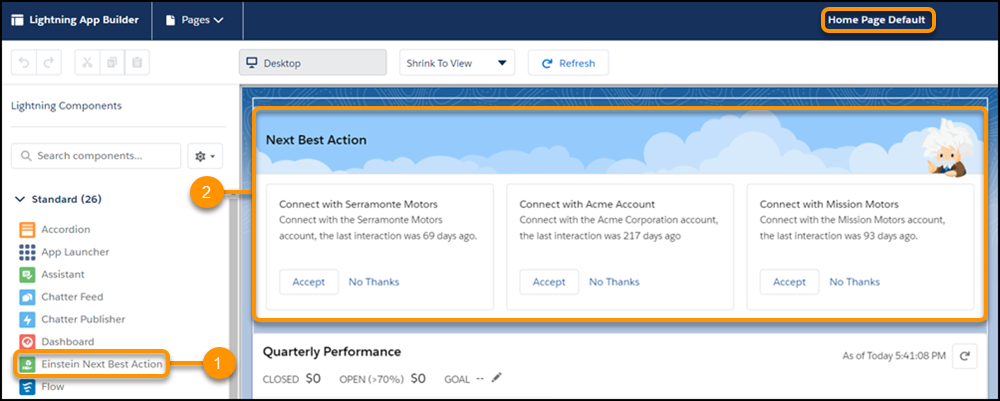
From the list of Lightning components on the left (1), drag the Einstein Next Best
Action component to the home page (2).
Experience Builder Site Page (Experience Builder)
In Experience Builder, create or edit a site page.
Drag Suggested Actions from the component list to the location on the page where you
want to display it.
Visualforce Page: Use Lightning Out to add the lightning:nextBestAction component.
Custom Apps: Add Einstein Next Best Action functionality into your app with the global
lightning:nextBestAction component.
Einstein Next Best Action Component Einstein Next Best Action uses strategies that apply your org’s business rules to display context-sensitive suggested offers and actions on your Lightning record pages.
We use three kinds of cookies on our websites: required, functional, and advertising. You can choose whether functional and advertising cookies apply. Click on the different cookie categories to find out more about each category and to change the default settings.
Privacy Statement
Required Cookies
Always Active
Required cookies are necessary for basic website functionality. Some examples include: session cookies needed to transmit the website, authentication cookies, and security cookies.
Functional Cookies
Functional cookies enhance functions, performance, and services on the website. Some examples include: cookies used to analyze site traffic, cookies used for market research, and cookies used to display advertising that is not directed to a particular individual.
Advertising Cookies
Advertising cookies track activity across websites in order to understand a viewer’s interests, and direct them specific marketing. Some examples include: cookies used for remarketing, or interest-based advertising.