Loading
Salesforce now sends email only from verified domains. Read More
Automate Your Business Processes
Table of Contents
Select Filters

          No results
          No results
          Here are some search tips

          Check the spelling of your keywords.
          Use more general search terms.
          Select fewer filters to broaden your search.

          Search all of Salesforce Help
          Launch a Flow When a Recommendation Is Accepted or Rejected

          Launch a Flow When a Recommendation Is Accepted or Rejected

          Each recommendation is associated with a single flow. By default, Next Best Action launches a flow when a user accepts a recommendation. The flow then performs an action, such as updating a case or sending an email. But you can also launch a flow when a user rejects a recommendation, which gives you more flexibility. For example, a flow could run an automated process, write to another system, or create a reminder email when a recommendation is rejected.
          Required Editions

          View supported editions for Next Best Action.
          User Permissions Needed
          To open, edit, or create a flow in Flow Builder: Manage Flow
          To create and save Lightning pages in the Lightning App Builder: Customize Application
          To run a recommendation strategy on a Lightning record page:

          Run Flows

          OR

          Flow User field enabled on the user detail page

          For example, at a telecommunications company, the admin configures the Next Best Action component to display recommendations to its customer service representatives (CSRs). When a CSR accepts a recommendation for a customer who wants to purchase a discounted service, a flow is launched to calculate the discount. The admin analyzes the reactions to the recommendation, and is confused about why the CSRs are rejecting it. To help get answers, the admin uses Next Best Action to launch a questionnaire flow every time the recommendation is rejected.

          This feature is available for:

          • The Einstein Next Best Action component used with Lightning record pages
          • The Suggested Actions component used in Experience Builder
          • The Actions and Recommendations component used with Lightning console apps

          To assign a flow that runs when a customer accepts or rejects the recommendation, create an input variable in the flow to accept the isRecommendationAccepted value. Then add a Decision element to the flow that’s based on that value.

          1. In Flow Builder, configure a flow that’s associated with a recommendation. Be sure to activate the flow because Next Best Action can’t call an inactive flow from a recommendation.
          2. Create the Boolean isRecommendationAccepted input variable.
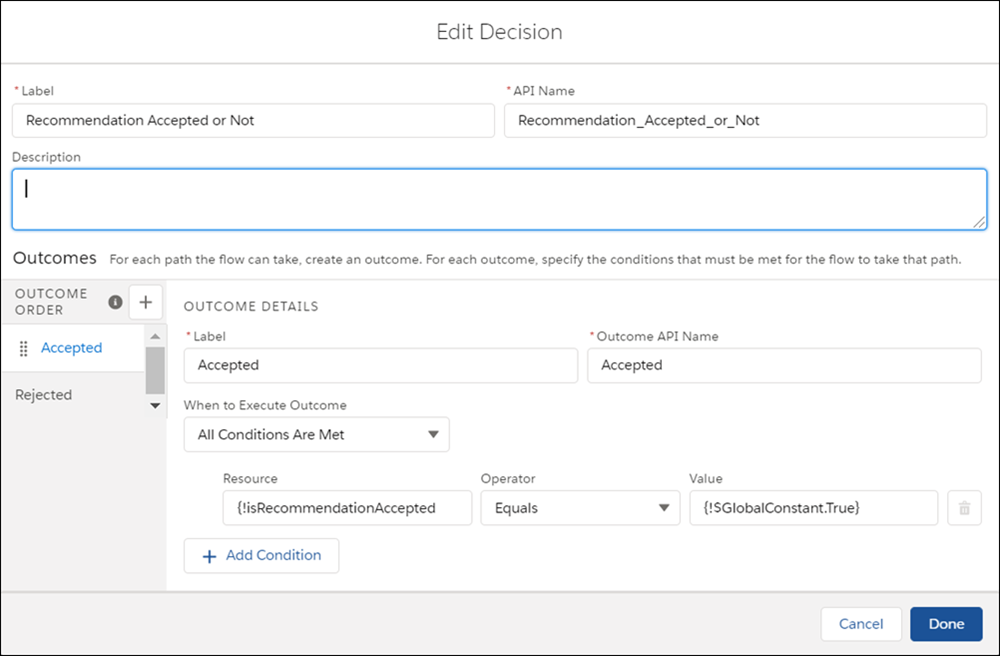
          3. Add a Decision element and select Manually Set Conditions, and use the isRecommendationAccepted variable in your outcome conditions.
          4. Set the outcome label of the first outcome to Accepted. Then configure the first decision outcome to determine whether the isRecommendationAccepted variable is true.
          5. Change the label of the Default Outcome to Rejected.
            The Decision element with the isRecommendationAccepted variable
          6. Add any additional flow elements to handle each outcome path.
          7. Add a flow action.
          8. To add the flow, edit the recommendation.
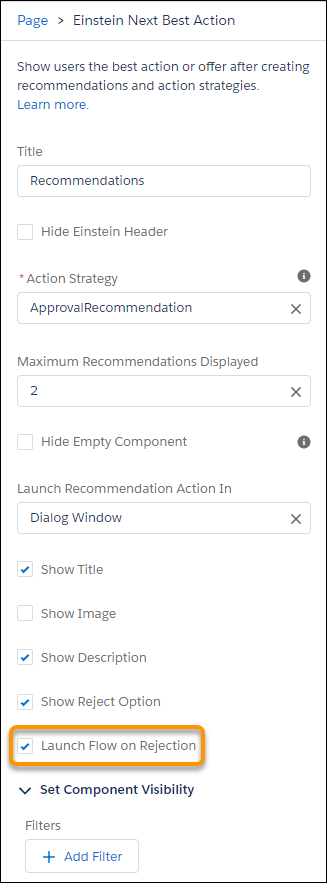
          9. When you add the Next Best Action component to a Lightning record page, select Launch Flow on Rejection.
            The Next Best Action component with the Launch Flow on Rejection checkbox
           
          Loading
          Salesforce Help | Article
