You are here:
Recommendation Fields
Recommendations are suggested actions that users see and interact with through Einstein Next Best Action strategies. When creating a recommendation, use these fields to define its look and feel.
Required Editions
You can use these methods to create recommendations.
- Assemble recommendations as needed in Flow Builder or Strategy Builder.
- Create recommendations as standard Salesforce records, similar to accounts and contacts, in the Recommendation object. You can create recommendation records on the Recommendations tab in the App Launcher.
- Generate recommendations automatically through AI with Einstein Recommendation Builder.
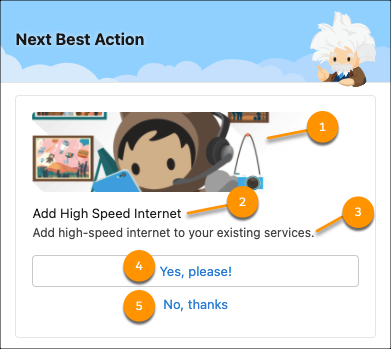
- Image (1)—The image that is shown in the recommendation. To display this image with the Einstein Next Best Action Lightning page component, select Show Image when configuring the Lightning page component.
- Name (2)—The header text at the top of the recommendation. To display this text with the Einstein Next Best Action Lightning page component, select Show Title when configuring the Lightning page component.
- Description (3)—Additional descriptive text displayed in the recommendation. To display this text with the Einstein Next Best Action Lightning page component, select Show Description when configuring the Lightning page component.
- Acceptance Label (4)—The text of the button that accepts the recommendation. This option is always displayed.
- Rejection Label (5)—The text of the button that rejects the recommendation. To display this option with the Einstein Next Best Action Lightning page component, select Show Reject Option when configuring the Lightning page component.
Use these fields to define how the recommendation runs.
Action
The flow that runs when a user selects the Accept option. To run this flow when the user accepts or rejects the recommendation, select Launch Flow on Rejection when configuring the Einstein Next Best Action Lightning page component. If the referenced flow is inactive, invalid, or has an unsupported Flow Type, the recommendation isn’t displayed to users. The supported flow types are screen flows and autolaunched flows.
