Create a custom report type to report on and track recommendation data and strategy
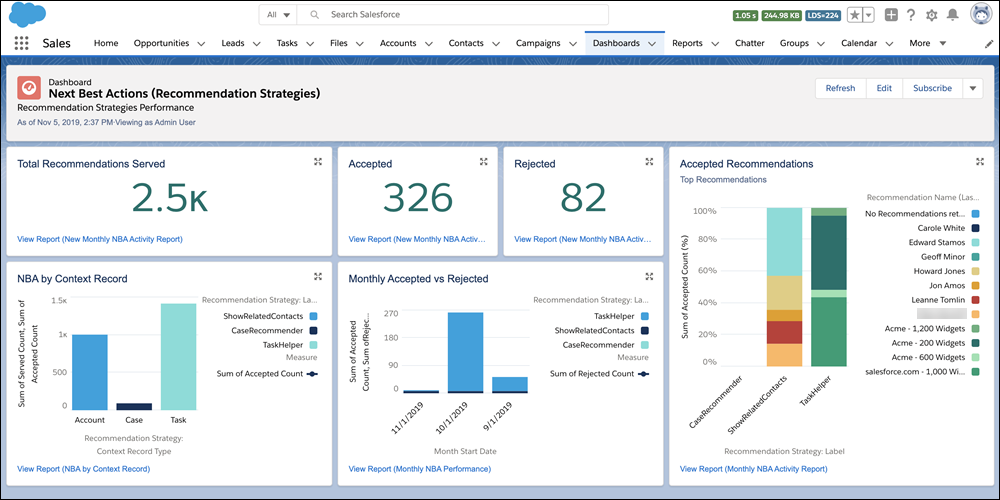
metrics. You can see the monthly total recommendations that a Salesforce org’s strategies served.
And you can analyze which recommendations are accepted and rejected, who responds to them, and
more.
Modify All Data or Manage Next Best Action Strategies
Salesforce updates recommendation strategy metrics each time a strategy is executed or a
recommendation is accepted or rejected. Analyze usage metrics to better understand how your
strategies are performing. Use this knowledge to improve your strategies’ logic and increase
their effectiveness.
For example, run A/B tests on two different strategies and compare their
relative performance. If your service agents accept more recommendations served from Strategy B,
use metrics to discover why.
For complete instructions on creating custom report types, search for Create a Custom
Report Type in Salesforce Help.
For strategy-level data that’s aggregated for each calendar month, use the Recommendation
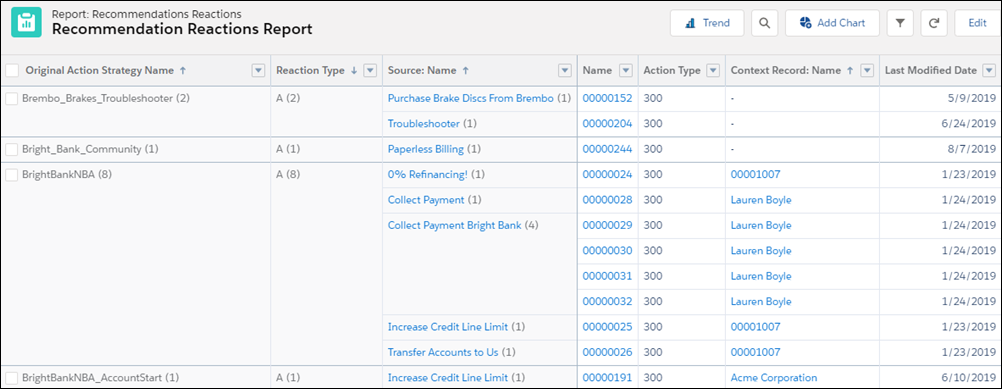
Strategy Metrics primary object. For recommendation-level details, use the Recommendation
Reactions primary object instead.
Using the Recommendation Strategy Metrics primary object, combine fields from it (like
Recommendation Source ID) and the related strategy (like Context Record Type). Using the
Recommendation Reactions primary object, include fields to report on, such as Context Record
ID, Created Date, Last Modified Date, Recommendation Score, and Source ID.
To analyze a strategy’s performance, group your strategy executions by recommendation
source ID, and the number of times a recommendation was served, accepted, and rejected. To
compare performance between two different strategies, group your strategy executions by
recommendation source ID. Add useful metadata to your report, such as recommendation
description and create date.
Deploy the report types you want to make available to users.
Let users know that they can create reports using these custom report types.
Users can also create dashboards from the custom report type.
We use three kinds of cookies on our websites: required, functional, and advertising. You can choose whether functional and advertising cookies apply. Click on the different cookie categories to find out more about each category and to change the default settings.
Privacy Statement
Required Cookies
Always Active
Required cookies are necessary for basic website functionality. Some examples include: session cookies needed to transmit the website, authentication cookies, and security cookies.
Functional Cookies
Functional cookies enhance functions, performance, and services on the website. Some examples include: cookies used to analyze site traffic, cookies used for market research, and cookies used to display advertising that is not directed to a particular individual.
Advertising Cookies
Advertising cookies track activity across websites in order to understand a viewer’s interests, and direct them specific marketing. Some examples include: cookies used for remarketing, or interest-based advertising.