You are here:
Strategy Builder Enhance Element
Get AI-driven predictions from services such as Einstein Discovery and Einstein Prediction Builder to enhance Next Best Action recommendations with additional information, such as propensity scores. The Enhance element allows you to modify a set of recommendations on the fly, every time a strategy is executed. These recommendations can be static and live as records in Salesforce, or dynamic and sourced from external data sources or other Salesforce objects.
Required Editions
| View supported editions for Next Best Action. |
| Field | Description |
|---|---|
| Label | The name of the element as it appears on the canvas. |
| API Name | The API name of the element. The API name must be unique. |
| Description | Optional description of the element and how it works within the strategy. |
| Apex Action | Search or select an Apex action, which calls an Apex class. An Apex class must have a method marked as an invocable method to appear as an Apex action in declarative tools like Strategy Builder. |
| Argument | Specify one or more parameters for the selected Apex action. |

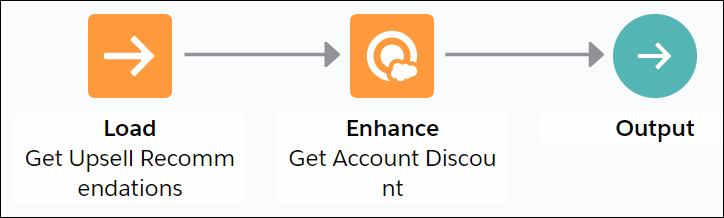
The strategy used with an Enhance element can be as simple as Load -> Enhance -> Output. All recommendations the Load element retrieves or loads are passed as a list of recommendations to the underlying invocable method.
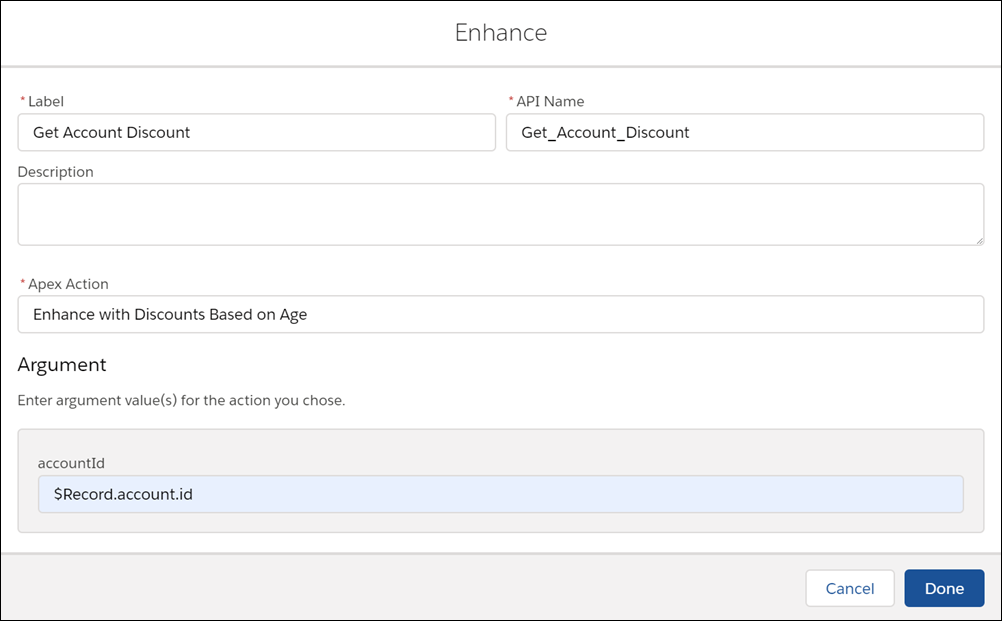
When configuring the Enhance element, select Enhance with Discounts Based on Age as the Apex action and specify $Record.id as the input parameter.
The Enhance element in turn calls the getDiscounts
invocable method in the Enhance_GetAccountDiscount class.
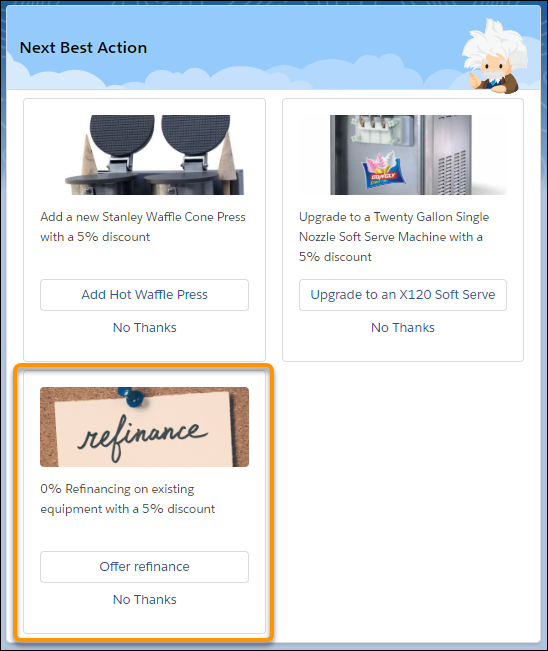
Notice how the description of each recommendation has a discount value appended to it (r.Description + ‘ with a 5%
discount’).
global class Enhance_GetAccountDiscount {
    @InvocableMethod(label='Enhance with Discounts Based on Age' description='Returns an enhanced set of recommendations with appropriate discounts')
    global static List<List<Recommendation>> getDiscounts(List<DataContainer> inputData){

        List<Recommendation> recommendations = inputData[0].recommendations;
        List<List<Recommendation>> outputs = new List<List<Recommendation>>();
        Account[] accounts = [SELECT Name, Description,CreatedDate, id FROM Account WHERE id = :inputData[0].accountId];
           Double ageAccountMonths = accounts[0].CreatedDate.date().monthsBetween(date.today());
        Double ageAccount = ageAccountMonths/12;
        List<Recommendation> returnedRecommendations = new List<Recommendation>();
        for (Recommendation r:recommendations){
            if(ageAccount > 1){
                r.Description = r.Description + ' with a 5% discount';
            }
            else if (ageAccount > 2){
                r.Description = r.Description + ' with a 10% discount';
            }
            else if (ageAccount > 5){
                r.Description = r.Description + ' with a 20% discount';
            }
            returnedRecommendations.add(r);
        }
        outputs.add(returnedRecommendations);
        return outputs;

    }

}
Usage
The Enhance element requires an Apex action marked as an invocable method.
@InvocableMethod(
label='Enhance with Discounts Based on Age'
description='Returns an enhanced set of recommendations with appropriate discounts')
Use the Enhance element in combination with the Strategy Builder Load or Generate element.
The Enhance element can pass any number of inputs to the Apex action. The input parameter must
be a list or a list of lists of a user-defined Apex object (for example, a custom class called
DataContainer). The user-defined Apex object must include
a List<Recommendation> variable. The List<Recommendation> variable is automatically defined with the
recommendations that pass into the Enhance element.
global class DataContainer {
    @InvocableVariable
    public string accountId;

    @InvocableVariable
    public List<Recommendation> recommendations;
}
________
global static List<List<Recommendation>> invocableMethod(List<DataContainer> inputData)
The Enhance element returns a list of recommendations, List<List<Recommendation>>. These recommendation enhancements exist only in
memory and don’t persist after the strategy is executed.
global static List<List<Recommendation>> invocableMethod(List<DataContainer> inputData)
