You are here:
SEO Best Practices and Considerations for Guest Users
To configure your site for search engine optimization (SEO), Salesforce uses the guest user profile to identify the public pages and objects available for indexing. A search engine is considered a guest, or unauthenticated, user. For Experience Builder sites, Salesforce automatically generates a sitemap with a list of the publicly accessible content. For sites built with Salesforce Tabs +Visualforce, you’re responsible for creating the sitemap and indicating which pages are included.
| Available in: Salesforce Classic and Lightning Experience |
| Available in: Enterprise, Performance, and Unlimited Editions |
Experience Builder Sites
You identify the standard and custom, but not chatter, objects available for SEO using the Experience Builder guest user profile. Objects and associated fields assigned read access are added to the sitemap.
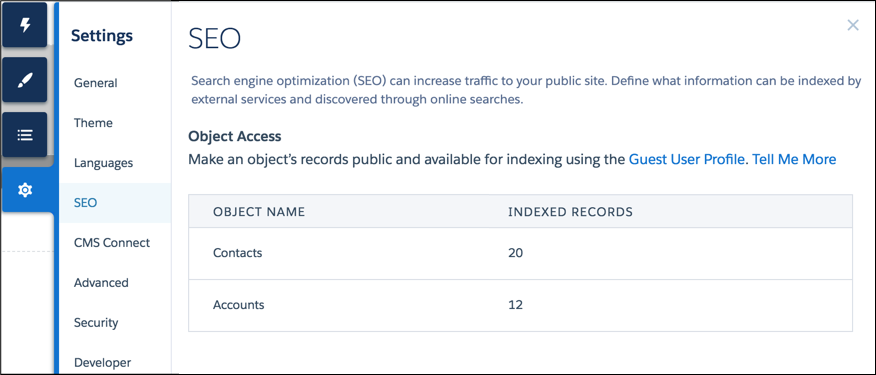
- To control the scope of your sitemap and help keep your site secure, regularly review which
objects are public and the number of records exposed for each object. From Experience Builder,
go to list. It can take up to 24 hours for the Object Access list to be refreshed and
include object pages and records newly made public.
- Even though an object and its fields are public, Salesforce security settings still determine guest user access to this data. To ensure that object data is available to search engines, review the sharing rules, field-level security (FLS), and permission sets assigned to that object.
- Make sure that all sensitive objects are private, even the objects used in private pages not included in the sitemap. All public pages and public objects are discoverable because search engines use the sitemap only as a starting point to identify which site content is available for crawling.
- If you enable guest user access for an object that has existing records, manually trigger the full sitemap generation. Otherwise, the sitemap doesn’t include the object’s records until the next automatic sitemap regeneration, which can be up to a week later.
Salesforce Tabs + Visualforce Sites
- In your sitemap, include only publicly accessible Visualforce pages and objects that you want discoverable by search engines.
- Use robots.txt for more control over which data is available for search engines to index when they crawl your site.
- Submit your sitemap to search engines, such as Google Search Console, only after completing the previous steps.

Note
- The generation of your sitemap.xml file is limited to production environments. The file isn’t created in a sandbox.
- All standard and object pages that require authentication as part of a publicly accessible site aren’t included in the sitemap file. As a result, they aren’t exposed to search engines for indexing.
Did this article solve your issue?
Let us know so we can improve!
