You are here:
Discover Which Records Are Available to Guest Users
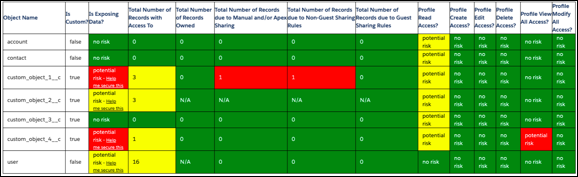
Use Authenticated and Guest User Access Report and Monitoring, available for free on AppExchange to see which objects and permissions users can access from your public sites. The report shows you the total number of records per object that users can access. The report also categorizes records owned by users, records shared with manual or Apex sharing, and queue or public group membership information.
Here’s an example of a report.
After you determine which records users can access, you have three options to secure the records:
- If record sharing is due to ownership, reassign the records owned by guest users to other users in your org.
- If record sharing is due to guest user membership in queues or public groups, remove guest users from queues and public groups.
- If record sharing is due to manual or Apex sharing, remove records shared via manual or Apex sharing.

Did this article solve your issue?
Let us know so we can improve!
