You are here:
Flow Orchestration Background Steps
A background step launches an active autolaunched flow and has no user interaction. You can control when a background step is ready to start.
Required Editions
| View supported editions for Flow Orchestration. |

Background Step Work Cycle
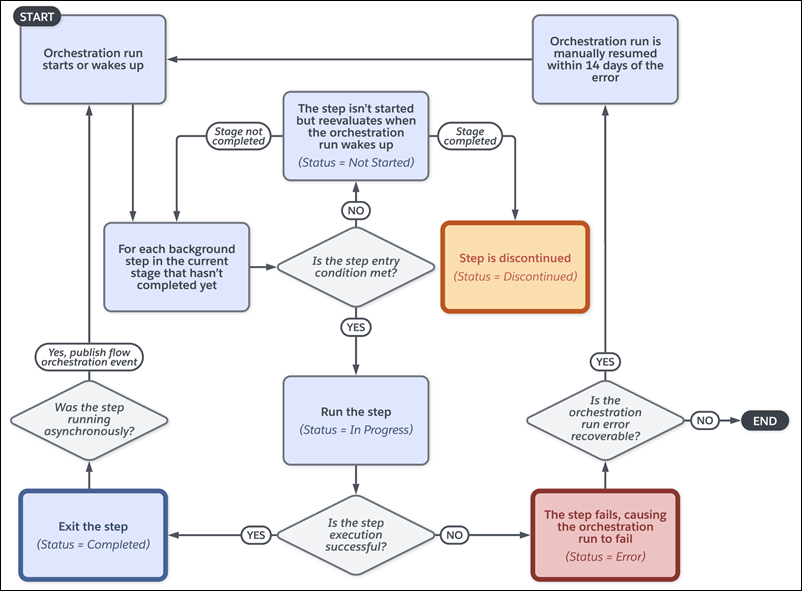
Background Step Processing
Each background step references an active autolaunched flow. When the orchestration runs, it automatically determines whether the step’s flow runs synchronously or asynchronously.
An orchestration run processes a background step asynchronously when the step's flow contains 1 or more Subflow or Wait elements. How a background step with one or more Action elements runs depends on the orchestration run's API version.
For orchestrations running in API version 68.0 and later, a background step with a flow containing synchronous actions runs synchronously. A background step with a flow containing asynchronous actions runs asynchronously.
For orchestrations running in API version 67.0 and earlier, any background step with a flow containing an Action element runs asynchronously.
When a background step’s flow runs synchronously, the orchestration resumes when the flow is completed.
When a background step’s flow runs asynchronously, the step publishes a Flow Orchestration Event platform event. When the orchestration run receives the event, it evaluates the current stage and each of its Not Started or In Progress steps.
When to Start the Step
To control when a background step starts, select a condition.
| Step Condition | Requires |
|---|---|
| When the stage starts, the step starts | — |
| When another step is marked Completed, the step starts | The name of the step that must be completed before the step can start |
| When the specified requirements are met, the step starts | Up to 10 requirements that determine whether the step can start |
| When the specified evaluation flow returns True, the step starts | The name of the active evaluation flow that determines whether the step can start |
Running Context of an Action Called by a Background Step
For API version 60.0 and later, the autolaunched flow called by a background step runs in the context of the Automated Process User by default. To specify a different user's context, use the Select Who to Run the Action As section in the background step's Properties panel. To control the system context's record-level access, use the How to Run the Flow advanced option of the autolaunched flow.
For API version 59.0 and earlier, an active autolaunched flow called by a background step runs in the same context that the orchestration runs in.
| Orchestration Runs In | Associated Flow Runs In |
|---|---|
| System context | System context: To control the sharing access, use the How to Run the Flow advanced option of the autolaunched flow. |
| User context | User context: To control the permission and sharing access, use the How to Run the Flow advanced option of the autolaunched flow. |
For API version 59.0 and earlier, the context of the autolaunched flow called by an asynchronous background step depends on the parent orchestration run.
| Orchestration Runs In | Associated Flow Runs In |
|---|---|
| System context | The Automated Process user in system context: To control the sharing access, use the How to Run the Flow advanced option of the autolaunched flow. |
| User context | The same context that the orchestration ran in before the step: Control the permission and sharing access with the How to Run the Flow advanced option of the autolaunched flow. |
