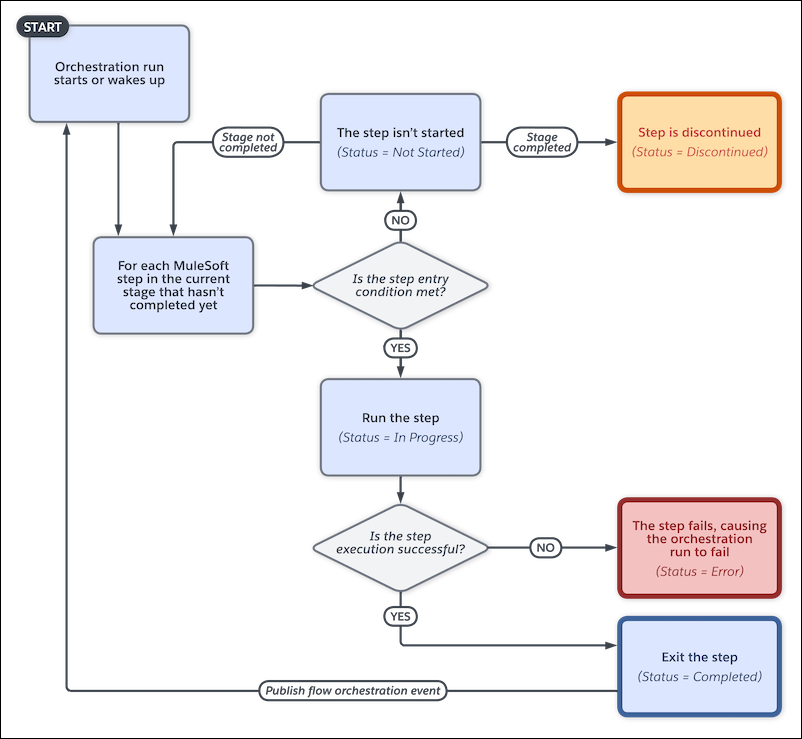
A MuleSoft step asynchronously runs an operation imported from a MuleSoft API and has no
user interaction. You can control when a MuleSoft step is ready to start.
Note The Step resource in Flow Orchestration isn't
related to the discontinued Step element in flows.
MuleSoft Step Work Cycle
When to Start the Step
To control when a MuleSoft step starts, under Select When to Start the Step, select a
condition.
Step Condition
Requires
When the stage starts, the step starts
—
When another step is marked Completed, the step starts
The name of the step that must be completed before the step can start
When the specified requirements are met, the step starts
Up to 10 requirements that determine whether the step can start
When the specified evaluation flow returns True, the step
starts
The name of the active evaluation flow that determines whether the step can
start
Running Context of a MuleSoft Action Called by a MuleSoft Step
For API version 60.0 and later, by default, a MuleSoft action called by a MuleSoft step runs
in the context of the Automated Process User. To run a MuleSoft action in the context of a
different user, use the Select Who to Run the Action As section in the MuleSoft step's
Properties panel.
For API version 59.0 and earlier, a MuleSoft action called by a MuleSoft step runs in the
context of the user that the orchestration ran as before the MuleSoft step starts.
We use three kinds of cookies on our websites: required, functional, and advertising. You can choose whether functional and advertising cookies apply. Click on the different cookie categories to find out more about each category and to change the default settings.
Privacy Statement
Required Cookies
Always Active
Required cookies are necessary for basic website functionality. Some examples include: session cookies needed to transmit the website, authentication cookies, and security cookies.
Functional Cookies
Functional cookies enhance functions, performance, and services on the website. Some examples include: cookies used to analyze site traffic, cookies used for market research, and cookies used to display advertising that is not directed to a particular individual.
Advertising Cookies
Advertising cookies track activity across websites in order to understand a viewer’s interests, and direct them specific marketing. Some examples include: cookies used for remarketing, or interest-based advertising.