Loading
Salesforce now sends email only from verified domains. Read More
Automate Your Business Processes
Table of Contents
Select Filters

          No results
          No results
          Here are some search tips

          Check the spelling of your keywords.
          Use more general search terms.
          Select fewer filters to broaden your search.

          Search all of Salesforce Help
          Determine Flow Usage in an Orchestration Version

          Determine Flow Usage in an Orchestration Version

          Orchestration versions use flows to run interactive and background steps. Orchestration version stages and steps can use flows to evaluate complex criteria. Those criteria can determine when a background, interactive step, or MuleSoft step starts and when to mark a stage or interactive step as completed. View the flows that an orchestration version uses to understand the relationships between an orchestration version and the flows it references.

          Required Editions

          View supported editions for Flow Orchestration.
          User Permissions Needed
          To view usage details on the Orchestrations tab in the Automation Lightning app Manage Flow

          The Uses Flows list depends on whether the selected orchestration version was created in your org. If Salesforce or a managed package provided the orchestration version, then the Uses Flows list contains no items.

          1. On the navigation bar, click App Launcher icon.
          2. In the search box, enter automation, and then select Automation.
            The Automation app opens.
          3. Select the Orchestrations tab, click an orchestration label, and then select the Versions tab.
            The Orchestration page opens and shows a list of versions for the selected orchestration.
          4. Click the link of an orchestration version name, and then select the Usage tab.
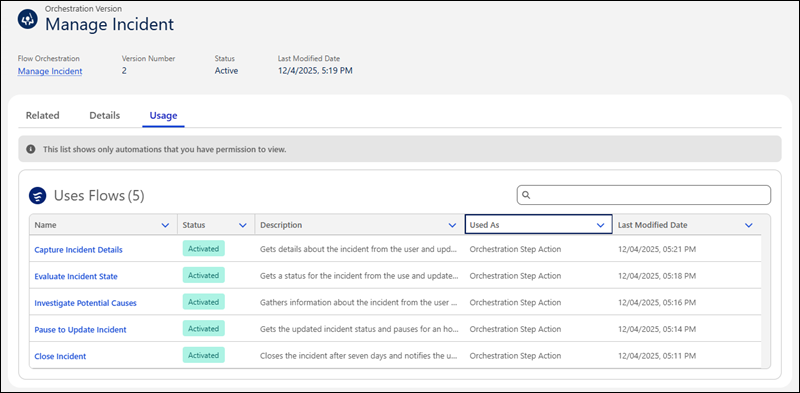
            The tab shows the flows that the orchestration version uses.
            A list of flows that a sample orchestration version uses
           
          Loading
          Salesforce Help | Article
