You are here:
Orchestration Run
An orchestration run represents an instance of a running orchestration.
Required Editions
| View supported editions for Flow Orchestration. |
An orchestration is an application built by your admin that uses stages, steps, and decisions to organize a complex business process.An orchestration run is a run-time instance of an active orchestration. Starting in API version 60.0, all orchestrations run in system context without sharing. For earlier API versions, the context that an orchestration run uses depends on the orchestration type. You can also specify the context by using the Advanced option How to Run the Orchestration. See Flow Orchestration Version Properties.
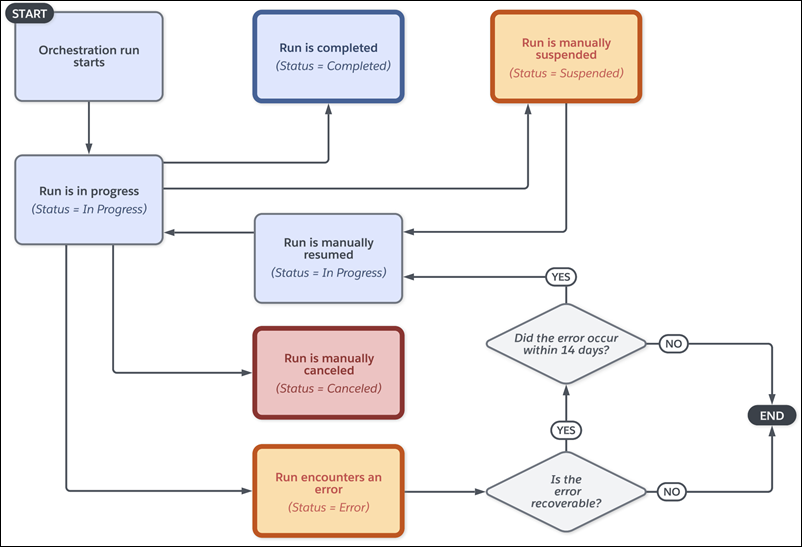
Resuming a Failed Orchestration
For information about configuring fault paths and error handling strategies, see Error Handling in Orchestrations.
An orchestration run can't recover from all errors that occur during its execution. Whether you can resume a failed orchestration run depends on where the error occurred.
Resuming requires an administrator to fix the underlying flow or error and then resume the orchestration run. This approach differs from fault paths, which an orchestration designer configures at design time. Fault paths handle errors gracefully and provide recovery mechanisms or manual intervention steps for end users.
Recoverable errors occur in two scenarios, and you have up to 14 days to fix these errors and resume the orchestration run.
- A flow called by a background or interactive step encounters an error.
- A step has a frozen or inactive assignee.
Non-recoverable errors occur in three scenarios, and you can't resume the errored orchestration run.
- An error occurs outside of the flows that steps call, such as when the orchestration prepares requests or processes results.
- An error occurs in an action called by a MuleSoft step.
- A step has an incorrectly configured assignee, such as a resource variable that doesn't resolve to a valid user, group, or queue.
When an orchestration run encounters an error, the system sets the status of affected orchestration runs, stage runs, and step runs.
| Item | Status Set To |
| Orchestration run | Error |
| Current stage run | Error |
| Errored step run | Error |
| In-progress step runs | Discontinued |
| Work items with an Assigned status | Completed |
If the error is recoverable, you fix the error in the flow and then resume the failed orchestration. When you resume, the system restarts the errored step. For background steps, the system re-runs the step with the fixed autolaunched flow. For interactive steps, the system creates another work item, and the assignee completes the step by using the fixed screen flow. See Resume a Failed Orchestration.
Resuming also affects discontinued steps from the current stage. For discontinued background or MuleSoft steps, if the step has no pending outputs, the system restarts the step. For discontinued interactive steps from the current stage, the system creates a replacement work item. If any discontinued step has pending outputs, the system processes the stored outputs and doesn't restart the step.
| Item | Status in Failed Run | When Run Is Resumed | Status in Resumed Run |
|---|---|---|---|
| Stage | Error | The stage resumes. | In Progress |
| Background or MuleSoft Step | Error | The step restarts. | In Progress |
| Background or MuleSoft Step | Discontinued (no pending outputs) | The step restarts. | In Progress |
| Background or MuleSoft Step | Discontinued (pending outputs) | The stored outputs are processed, and the step doesn’t restart. | Completed Error |
| Interactive Step | Error Discontinued |
A replacement work item is created for the step. | In Progress |
Fault Paths in Orchestration Runs
Fault paths provide error handling when an error occurs in a stage. When a stage has an attached fault path and an error occurs during processing, the orchestration follows the fault path. This approach to error handling provides an alternative to immediately terminating with a status of Error.
Fault paths are useful in scenarios where end users can provide manual intervention when the orchestration run encounters an error. For example, an external integration or API call fails because an endpoint is down. A fault path can include an interactive step where the assignee manually enters the required data.
What happens next depends on the fault path configuration. Fault paths containing elements run those elements. If the fault path terminates with an End element and no unhandled errors occur, the orchestration run ends with Completed status. An unhandled error in the fault path causes the orchestration run to end with a status of Error.
If the fault path connects back into the orchestration, the orchestration continues to run. It runs until completion or until an unhandled error occurs. This behavior is true whether the fault path contains elements or not. When an empty fault path connects back into the orchestration, the next element runs without any intervening processing.
The orchestration doesn't send error notifications when a fault path handles an error. However, you can add a background step to the fault path that notifies stakeholders when a failure occurs. The flow or action that encounters the error handles its own error notifications based on its error handling configuration.
For more information about fault paths in orchestrations, see Error Handling in Orchestrations.
Statuses and Milestones
After it’s created, an orchestration run has an associated status.
| Orchestration Run Status | Description |
|---|---|
| In Progress | The orchestration run started. |
| Completed |
|
| Suspended | The orchestration run was manually suspended. |
| Canceled | The orchestration run was manually canceled. |
| Error |
|
In logging, an orchestration run has several milestones.
| Orchestration Run Milestone | Description |
|---|---|
| Start Run | The orchestration run started or was manually resumed. |
| End Run | The orchestration run was completed. |
| Suspend Run | The orchestration run was manually suspended. |
| Cancel Run | The orchestration run was manually canceled. |
| Resume Run | The orchestration run was manually resumed. |
| Fail Run |
|
