You are here:
Permission Set Group Muting Dependencies
When you mute a permission in a permission set group, the muted permission impacts permissions that depend on it within the group. Understand how muting dependencies work and the effects of muting permissions on your users.
Required Editions
| Available in: both Salesforce Classic (not available in all orgs) and Lightning Experience |
| Available in: Contact Manager, Group, Essentials, Professional, Enterprise, Performance, Unlimited, Developer, and Database.com Editions |

Muting permissions in a permission set group offers you granular control over user permission assignments, but keep in mind the impact on dependent permissions. The table details object permission dependencies.
| When you mute: | These permissions are also muted: |
|---|---|
| Read | Create, Edit, Delete, View All Records, and Modify All Records |
| Edit | Delete and Modify All Records |
| Delete | Modify All Records |
| View All Records | Modify All Records |
When muting user permissions, pay attention to the permission change confirmation message when you save your changes for permission dependencies. For example, if you mute the Activate Contracts permission, then the Delete Activated Contracts permissions is muted as well.
Muting object permissions can also affect user permissions. For example, one of the permission sets in your permission set group includes the Activate Orders user permission. Because Activate Orders requires Read and Edit object permissions on Orders, these object permissions are enabled automatically. If you mute the Edit permission, the Activate Orders user permission is muted as a result.

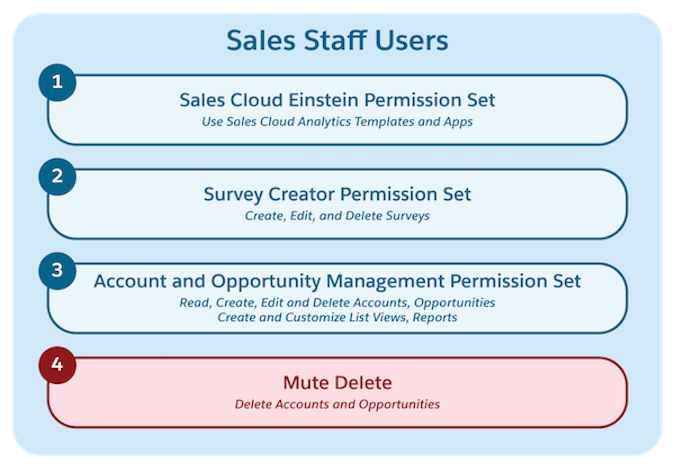
For example, the Sales Staff Users permission set group contains three permission sets and a muting permission set. The muting permission set mutes the Delete permission on Accounts and Opportunities.
When you mute Delete on an object, Modify All Records is automatically muted (even if you didn’t enable it for that object). Modify All Records becomes disabled because it depends on full object access, which is no longer available when you mute Delete.
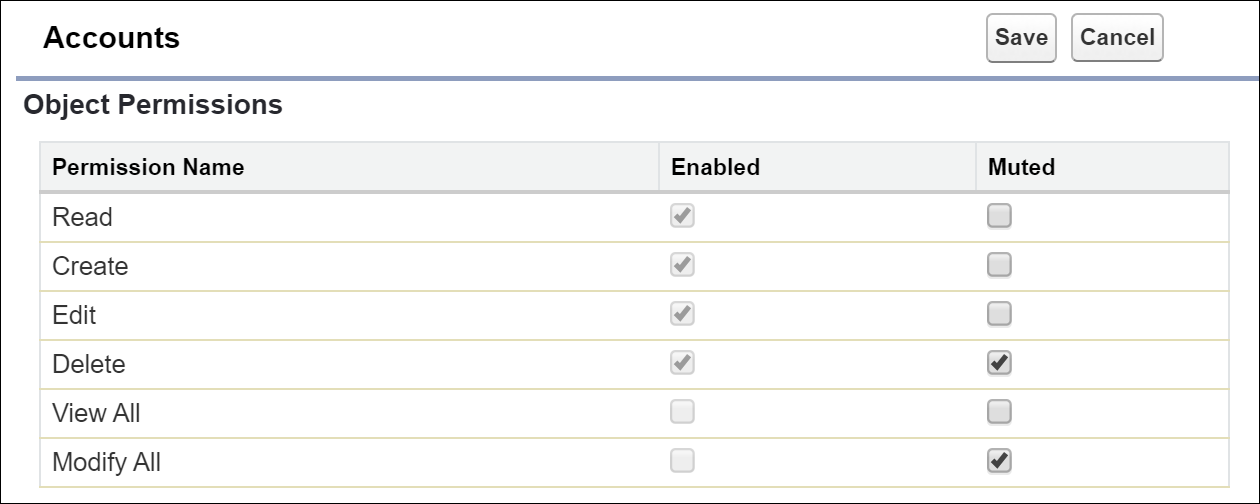
Similarly, if you mute Read on the object, then Create, Edit, Delete, View All Records, and Modify All Records are muted. If you can’t read object data, then you can’t perform actions such as delete on it.
