You are here:
Analyze Your Permission Assignments
Review your org’s permission assignments using the to quickly determine the permissions that a user has and the configuration that grants a specific permission.
Required Editions
| Available in: all editions except Starter |

Analyze Permissions Assigned to a User
For example, you want to see all
the permissions a specific user has. Use the Analyze by User feature to review all the profiles
and permission sets assigned to that user. You can also see the source of specific user
permissions by clicking  . The
window that appears shows the profile or permission sets, or both, that grant access.
. The
window that appears shows the profile or permission sets, or both, that grant access.
User permissions display in categories by standard object, custom object, setup entity access, and user permission.
Analyze by Assigned Permissions
The User Access and Permissions Assistant provides a variety of filters to help you view all users who are assigned the permission that you select. Information that shows for each permission includes the full name, username, alias, profile, active status, and last login for each user assigned that permission.
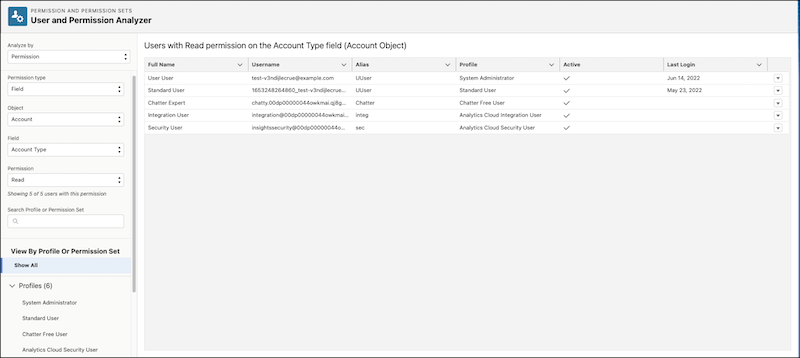
For example, you want to find a list of all staff with the Manage Users permission. Use Analyze by Permission to filter by the Manage Users permission and review the information on each user with that permission.
Analyze Permission Set Group Details
These details include combined user, standard object, custom object, and setup entity access permissions. You can also view the permission sets in each permission set group and the users the group is assigned to.

For example, you want to see what permissions are enabled as part of a specific permission set group. Use Analyze by Permission Set Group to view all combined permissions included in the permission set group and the users who are assigned the permissions.
- Analyze User Permissions
Find the permissions assigned to the selected user using the User Access and Permissions Assistant app. - Analyze Object Permissions
Find the permission types that are assigned to your selected object using the User Access and Permissions Assistant app. - Analyze Permission Set Groups
Find details about permission set groups using the User Access and Permissions Assistant app.
