You are here:
Specify When Your Actions Execute with a Schedule
In record-change processes and event processes, you can schedule actions to execute at a specific time. An action group that supports scheduled actions can have multiple schedules. For example, you can schedule some actions to execute one day from now and others to execute three days from now.
Required Editions
| Available in: both Salesforce Classic (not available in all orgs) and Lightning Experience |
| Available in: Essentials, Professional, Enterprise, Performance, Unlimited, and Developer Editions |
| User Permissions Needed | |
|---|---|
| To create, edit, or view processes: | Manage Flow AND View All Data |

After December 31, 2025, existing processes continue to run, and you can activate, deactivate, and edit them; however, we recommend using Flow Builder. To migrate existing processes, plan your switch to Flow Builder and use the Migrate to Flow tool. For new automations, create flows in Flow Builder.

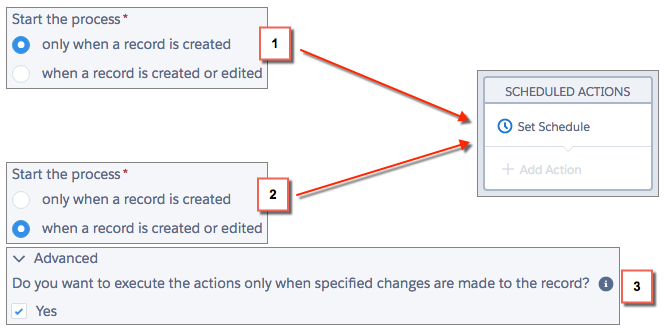
To schedule actions in a record-change process, make sure that one of the following options is true for your action group.
- The process starts only when a record is created (1).
- The process starts when a record is created or edited (2), and the associated criteria node executes actions only when specified changes are made (3).
- In an action group that supports scheduled actions, click Set Schedule.
-
If you
must
schedule actions based on a date/time field on the record that started the process:
- Leave the first radio button selected.
-
From the dropdown list on the right side of the panel, select the date to schedule the
action.
For example, if your process is based on an account record, choose the account’s Created Date.
-
Specify the number of days or hours before or after the field.
For a record-change process, if the criteria for this action group are still met when this time occurs, Salesforce executes the scheduled actions. For an event process, the criteria aren’t checked when this time occurs. If the criteria was met when the process started, Salesforce executes the scheduled actions.
-
If you
must
schedule actions after a certain number of days or hours from when the process is
executed:
- Select the second radio button.
-
Specify the number of days or hours from when the process is executed.
If the criteria for this action group are still met when this time occurs, Salesforce executes the scheduled actions.
- Save the schedule.
