You are here:
Opportunity Management Process Example
This example automates a single business process by using the Process Builder instead of workflow rules.
Required Editions
| Available in: both Salesforce Classic (not available in all orgs) and Lightning Experience |
| Available in: Essentials, Professional, Enterprise, Performance, Unlimited, and Developer Editions |

After December 31, 2025, existing processes continue to run, and you can activate, deactivate, and edit them; however, we recommend using Flow Builder. To migrate existing processes, plan your switch to Flow Builder and use the Migrate to Flow tool. For new automations, create flows in Flow Builder.
The example demonstrates how you can use the Process Builder to automate a single process by adding multiple groups of criteria and then associating individual actions with those criteria. In addition, some actions are available with the Process Builder that you can’t perform with workflow rules, such as creating records.
In this example, the process is defined to start when an opportunity record (1) is created or edited.
Three criteria nodes are then set up to check whether a high-value deal was won (2), a high-value deal was lost (3), or a quote was given (4). For the first criteria node that evaluates to true, the associated action group is executed.
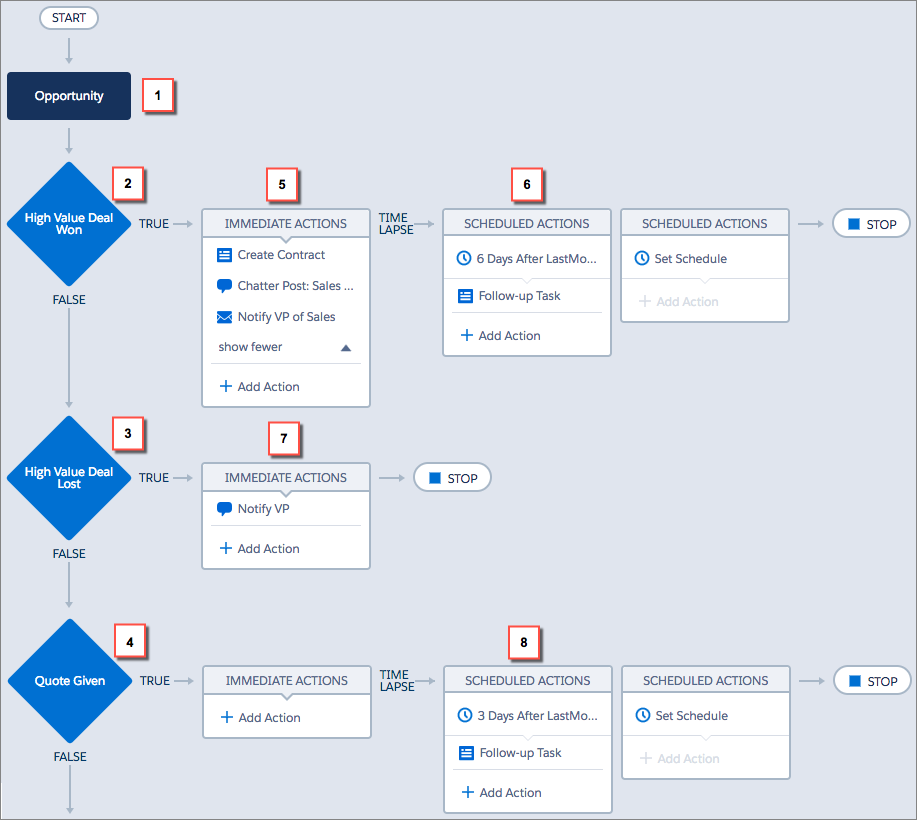
The High Value Deal Won criteria checks whether the opportunity’s stage is closed and won and also whether the opportunity’s amount is greater than $1,000,000.00. If both of these conditions are met, the associated action group is executed. For this criteria node, three immediate actions (5) and one scheduled action (6) are defined.
These actions:
- Create a draft contract record that's associated with the opportunity’s account.
- Congratulate the opportunity owner for closing and winning the opportunity by posting to the Sales Chatter group.
- Notify the VP of sales via email that the opportunity was closed and won.
- Create a high priority follow-up task for the associated account’s owner, which is scheduled to execute six days after the opportunity’s Close Date.
If the High Value Deal Won criteria conditions aren’t met, the associated group of actions doesn’t execute and the next criteria node (High Value Deal Lost) is evaluated.
The High Value Deal Lost criteria node checks whether the opportunity stage is closed and lost and whether the opportunity amount is greater than or equal to $1,000,000.00. If these conditions are true, we’ve set up an action (7) to notify the VP of sales by creating a chatter post on the opportunity record. The post identifies the opportunity and the opportunity amount that was lost.
If neither of the previous criteria conditions are met, the next criteria node defined in this process checks whether the opportunity stage is set to “Proposal/Quote Given.” If this condition is true, a scheduled action (8) is executed three days after the record is updated. The scheduled action creates a follow-up task for the opportunity owner to call to inquire about the opportunity.
Using the Process Builder, we’ve combined three criteria nodes and associated actions into a single, automated process. To automate the same business process with workflow, you would have to create three different workflow rules and use Apex triggers to create the contract record and post to the Sales Chatter group.
