You are here:
Field Picker
Use the field picker to reference fields on the record that started the process or fields on related records.
Required Editions
| Available in: both Salesforce Classic (not available in all orgs) and Lightning Experience |
| Available in: Essentials, Professional, Enterprise, Performance, Unlimited, and Developer Editions |

After December 31, 2025, existing processes continue to run, and you can activate, deactivate, and edit them; however, we recommend using Flow Builder. To migrate existing processes, plan your switch to Flow Builder and use the Migrate to Flow tool. For new automations, create flows in Flow Builder.
To use fields on a related record, click a field with  next to the value. For example, use the
Account ID field value on the case’s contact account.
next to the value. For example, use the
Account ID field value on the case’s contact account.
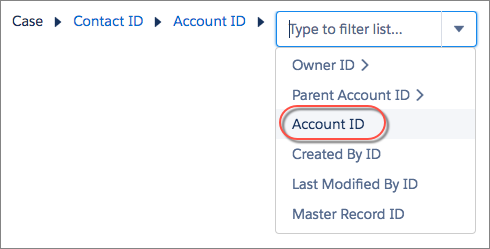
The field picker displays only the fields that are compatible with the selected parameter.
If you see a field multiple times, it means that the field can relate to multiple objects. For example, if you created a queue for cases, a case’s owner can be either a user or a queue. Owner ID is a polymorphic field—a field that relates to more than one object.
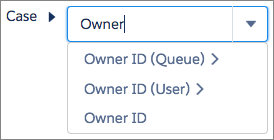
To access a field on the case’s owner, choose the appropriate relationship. If you select Owner ID (User) and the owner of the record is a queue, the process fails.

[Lead].Owner:Queue.Name in process criteria. Instead, use
[Lead].Owner:Queue.DeveloperName to reference the queue's API
name.
