You are here:
Multi-Select Picklists in the Process Builder
The Process Builder lets you select multiple values for a multi-select picklist field.
Required Editions
| Available in: both Salesforce Classic (not available in all orgs) and Lightning Experience |
| Available in: Essentials, Professional, Enterprise, Performance, Unlimited, and Developer Editions |

After December 31, 2025, existing processes continue to run, and you can activate, deactivate, and edit them; however, we recommend using Flow Builder. To migrate existing processes, plan your switch to Flow Builder and use the Migrate to Flow tool. For new automations, create flows in Flow Builder.
For example, set multiple values for the Country field for a company record that operates in Ireland, the UK, and France.
You can use multi-select picklists in:
- Formulas
- Process criteria
- Create a Record actions
- Quick Actions
- Update Records actions
In process criteria, set multiple values by creating one condition for each individual multi-select picklist value. For example, if your process checks whether changes were made to an account’s office locations, reference multiple values by choosing the same field for each multi-select picklist value.
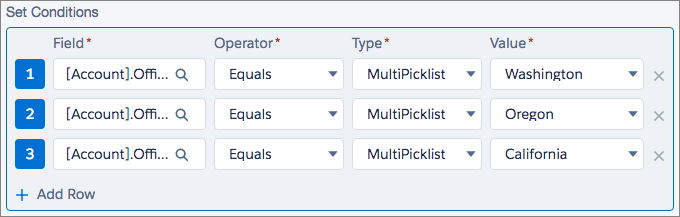
Refer to Tips for Working with Picklist and Multi-Select Picklist Formula Fields for more information.
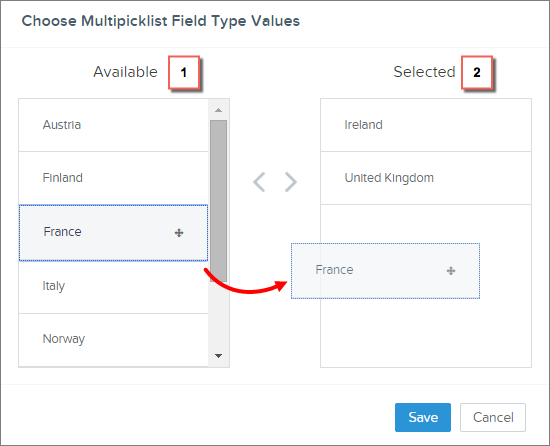
When you reference a multi-select picklist field in an action, enter values by clicking Choose values…
Add or remove values by dragging them between the Available (1) and Selected (2) columns.
Keep these considerations in mind when using operators with multi-select picklists.
- If you select only one value from a multi-select picklist field, you can use the Equals operator.
- If you use the Equals operator with multiple multi-select picklist values and choose the Any of the conditions are met (OR) option, the condition matches on one value only. For example, if your process checks whether a Region field equals West or East, the condition evaluates to true when the value is West or when the value is East, but doesn’t evaluate to true when both West and East are selected values.
- If you use Contains and OR to evaluate multiple multi-select picklist values, the condition evaluates to true on multiple values. For example, if your process checks whether a Region field contains West or East, the condition evaluates to true when a Region field contains West and East or when a Region field contains West or East values.
