
Loading
Feature Disruption - Service Cloud VoiceRead More
Feature degradation | Gmail Email delivery failureRead More
Enhance Salesforce with Code
Table of Contents
Select Filters

          No results
          No results
          Here are some search tips

          Check the spelling of your keywords.
          Use more general search terms.
          Select fewer filters to broaden your search.

          Search all of Salesforce Help
          Secure Identity for the Internet of Things

          Secure Identity for the Internet of Things

          Asset tokens are an open-standards-based JWT authentication token for verifying and securing requests from connected devices. They identify the device to a backend service that processes the stream of data and events from the device. They allow registration of device data with the Salesforce platform and linking it to Salesforce CRM data about the customer, account, or contact, helping you to act on behalf of the customer. You can even support custom business processes using asset token events. Asset tokens enable more proactive support and more predictive engagement with your customers, on an unprecedented scale.
          Required Editions

          Available in: both Salesforce Classic (not available in all orgs) and Lightning Experience
          Available in: All Editions

          For example, let’s say that your customer purchases a connected device and registers an account with your support community. Your company offers an app, such as a mobile app or a provisioning gateway, that acts as an agent for device registration. The app allows the user to connect to the device, log in to your support community, and register the device. Your community issues an asset token that identifies the device to your backend cloud service.

          After registration, the device can operate independently of the app, routinely sending data about its state and operations to your backend service. If the backend proactively detects an abnormal behavior or state, indicating an issue or potential issue, it automatically creates a case. The case is associated with the asset, which is tied directly to the customer’s contact record and your company’s support process. The device can also signal that resources such as ink toner are running low, predicting potential new opportunities to market and sell.

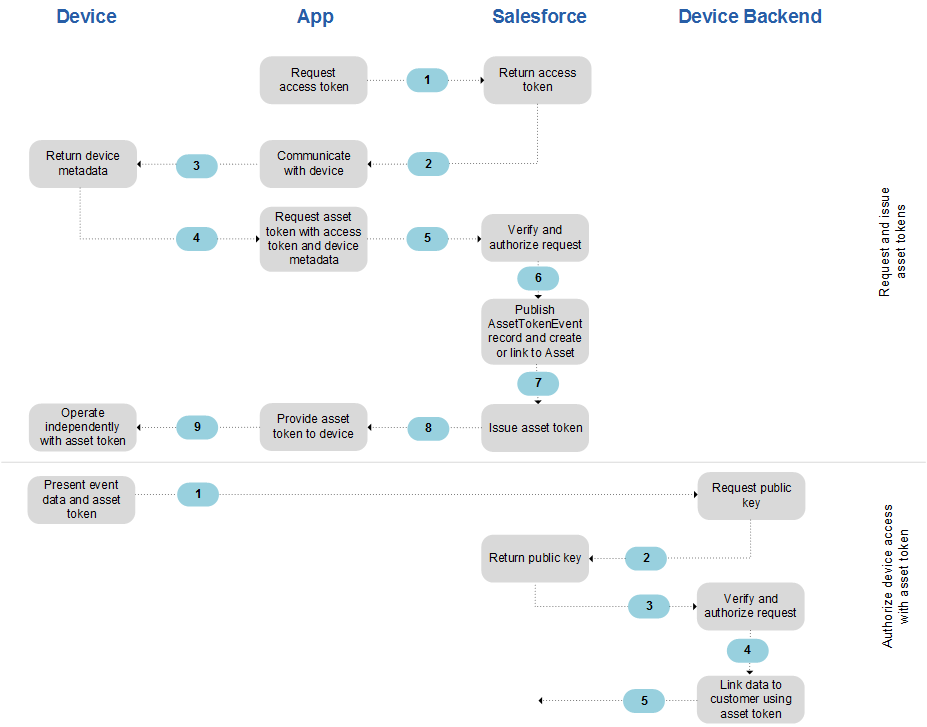
          This diagram shows how asset tokens are issued, verified, and used to secure calls to backend services for a connected device. Detailed steps follow.

          Asset token issuance, verification, and usage for a connected device

          Requesting and Issuing Asset Tokens

          • (1) The app that interacts with your device requests an access token for API access. The app can be any application, such as a mobile app or a provisioning gateway, that serves as a bridge between the device and Salesforce.
          • (2) Salesforce returns the access token.
          • (3) The app communicates with your device to request metadata, which can include a name, device ID, serial number, public key, or custom attributes.
          • (4) The device returns the requested metadata.
          • (5) The app sends its access token and device metadata to Salesforce, requesting an asset token.
          • (6) Salesforce verifies the authenticity of the request and the authorization of the app and user.
          • (7) Salesforce publishes an asset token event record and attempts to associate the device with an existing or new asset in the Service Cloud. If you’ve subscribed to receive platform events in Apex triggers to support custom business processes, they execute.
          • (8) Salesforce returns the asset token to the app.
          • (9) The app has now registered the asset and provides the asset token to the device, which can now operate independently from the app.

          Authorizing Device Access with Asset Tokens

          • (1) The device presents its data or event to your backend service along with the asset token. The backend service provides device functionality such as gathering telemetry data, monitoring device performance, and acting on behalf of the user.
          • (2) Your backend service requests the public key from Salesforce.
          • (3) Salesforce returns the device-specific public key.
          • (4) Your backend service validates the asset token and determines whether the device is authorized for the requested operation.
          • (5) Optionally, your backend service can use the asset token to identify the Salesforce account or contact who owns the device.
          • Prerequisites for Implementing Asset Tokens
            Complete the required and recommended prerequisites for asset tokens.
          • Using and Validating Asset Tokens
            After Salesforce issues an asset token, the device presents its data or event to your backend service along with the asset token. Your backend service validates the asset token and determines whether the device is authorized for the requested operation. Common methods for securing communications between the device and your backend service are the bearer token sequence and the JWT bearer token exchange sequence. Use standard open-source libraries to validate asset token JWTs.
          • Proof-of-Possession for Asset Tokens
            If you construct an actor token holding the public key of your asset and sign it with your asset’s private key, Salesforce binds that public key into your asset token. This pattern allows for what’s known as Proof-of-Possession or Holder of Key. The asset can prove that it holds the private key corresponding to the public key that Salesforce binds into the cnf claim during issuance. Proof-of-Possession helps provide greater assurance that the token is being presented by the actual asset it was issued to.
           
          Loading
          Salesforce Help | Article