You are here:
Install AgentExchange Apps Without Leaving Your Workflow
Install one or several apps from AgentExchange at once, directly inside Agentforce Builder. A progress strip tracks each install's status in the background, and you can dock it, expand it, or check it from anywhere in the builder while you keep working on your agent. A notification confirms when each install finishes and lets you know when its actions, subagents, agents, MCP Servers are ready to use.
Where: This change is available in Agentforce Builder and Agentforce Registry for free and free-trial AgentExchange listings in non-production orgs.
Who: This change impacts Agentforce Builder users who have permission to install apps.

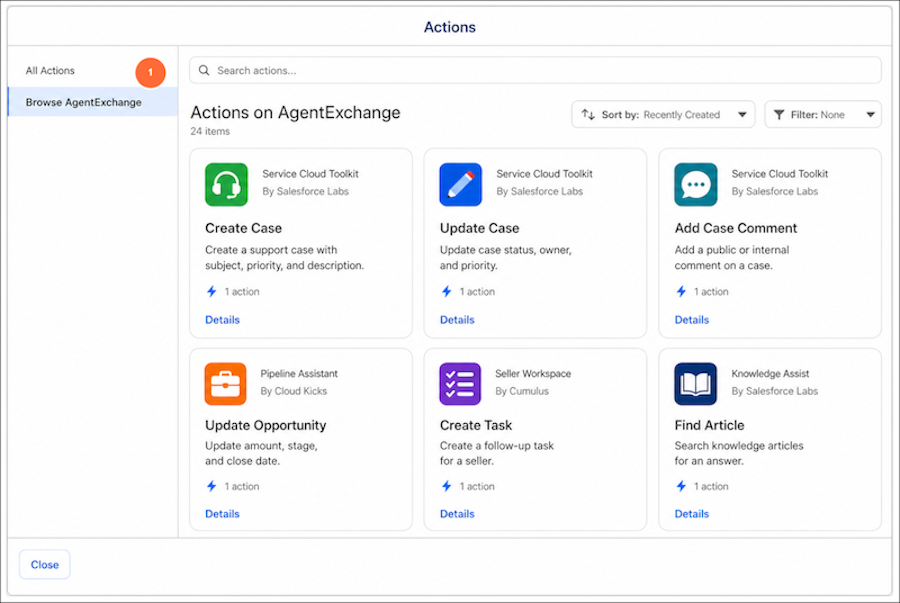
How: To browse and install an app from AgentExchange, from the App Launcher, find and select Agentforce Studio, and then open your agent. To browse subagents, from Explorer, click the + icon. To browse actions, from Explorer, select a subagent, then click the + icon. Select Add from Asset Library, then Browse AgentExchange (1).
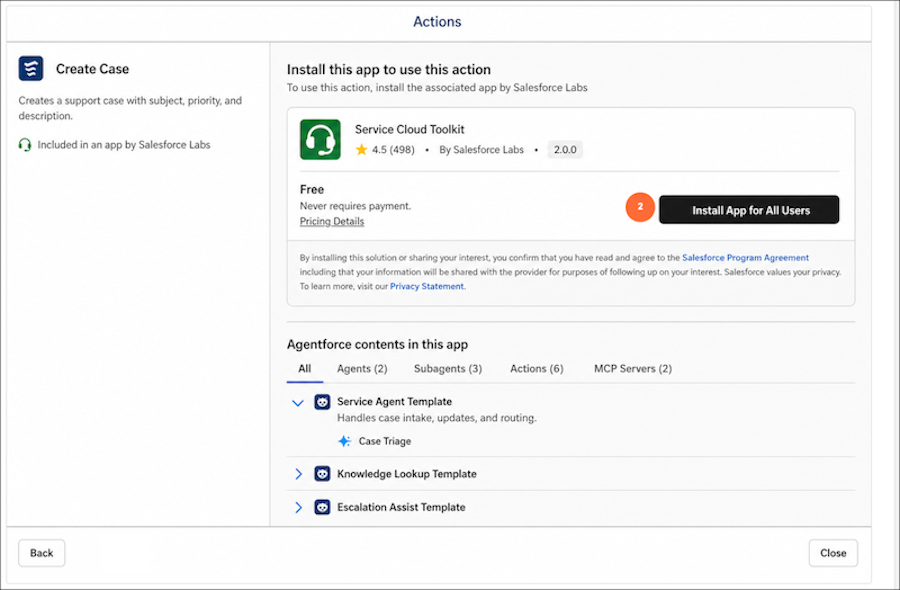
Click Install App for All Users (2) to start installation. A progress strip tracks the installation in the background, and a notification lets you know when the app's agents, subagents, or actions are ready to use.