You are here:
Gauge Relationship Health Quickly in Pipeline Inspection
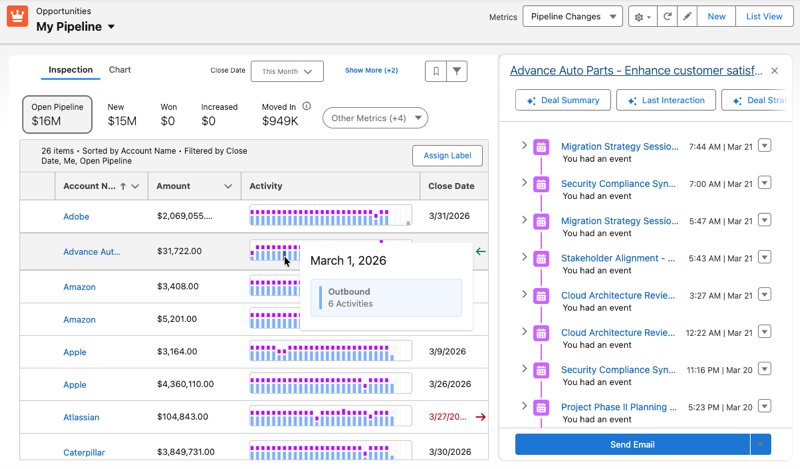
Give your sellers the ability to assess engagement levels without scrolling through the activity timeline. Pipeline Inspection now includes an Activity column with a heatmap that tracks inbound and outbound activities, such as voice calls, video calls, events, and emails, over a 30-day period.
Where: This change applies to Lightning Experience in Enterprise, Performance, Unlimited editions with Agentforce Sales.
When: The Activity column is available in Pipeline Inspection starting in May 2026.
Who: Users with Einstein Conversation Insights and Einstein Activity Capture can add the Activity column to Pipeline Inspection only if their data is stored natively on the Salesforce Platform.
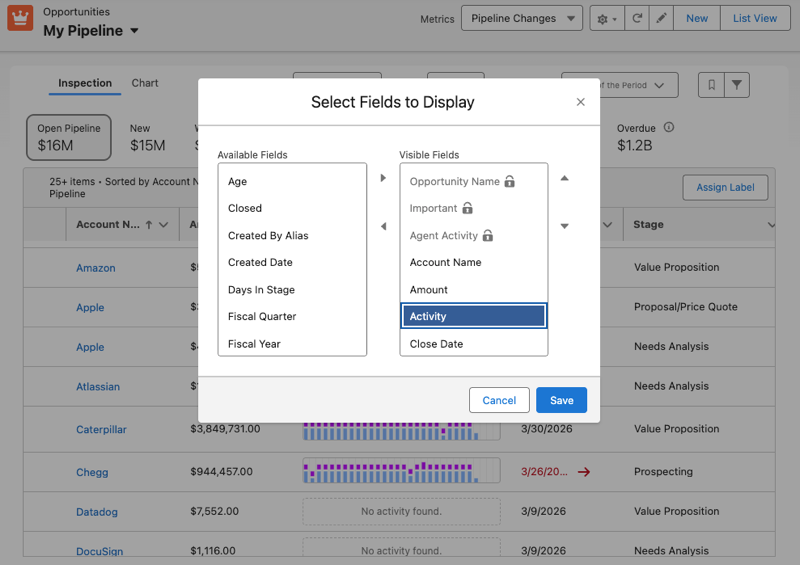
How: To add the Activity column to the Pipeline Inspection view, click the Gear icon and select Select Fields to Display. From the Available Fields area, move Activity into the Visible Fields area and click Save.
After adding the column, sellers can hover over a segment to view activity summaries or drill into activity details in the side panel.