You are here:
Upgrade Microsoft 365 Authentication in Einstein Activity Capture to Microsoft Graph
Transition your Einstein Activity Capture’s Microsoft Office 365 authentication to Microsoft Graph, to keep your data syncing without disruption when Microsoft retires Exchange Web Services (EWS) in October 2026. Microsoft Graph is the new, secure, and scalable standard for authentication. Proactive notifications and a single-click tool make the upgrade process smooth.
Where: This feature is available in Lightning Experience in Starter, Professional, Enterprise, Unlimited, Einstein 1 Sales, and Agentforce 1 Sales editions. It’s also available with the Einstein for Sales, Sales Engagement, and Revenue Intelligence add-ons.
When: This feature is available starting in February 2026.
Who: The upgrade is available if Einstein Activity Capture is configured to use Microsoft 365. If you’re setting up Einstein Activity Capture with Microsoft Office 365 starting in Spring ’26, you’re automatically authenticated by using Microsoft Graph.
Why: This upgrade is essential to align with Microsoft’s evolving security standards and to avoid potential disruptions as EWS reaches its end of life in October 2026. By transitioning to Microsoft Graph, Salesforce makes sure that your organization remains compliant and competitive, with improved support for modern features and enhanced user-level authentication.
How: Before and during the upgrade, make sure that your Azure admin has granted Microsoft Graph consent. Then, use the upgrade tool to authorize the connection and complete the transition.
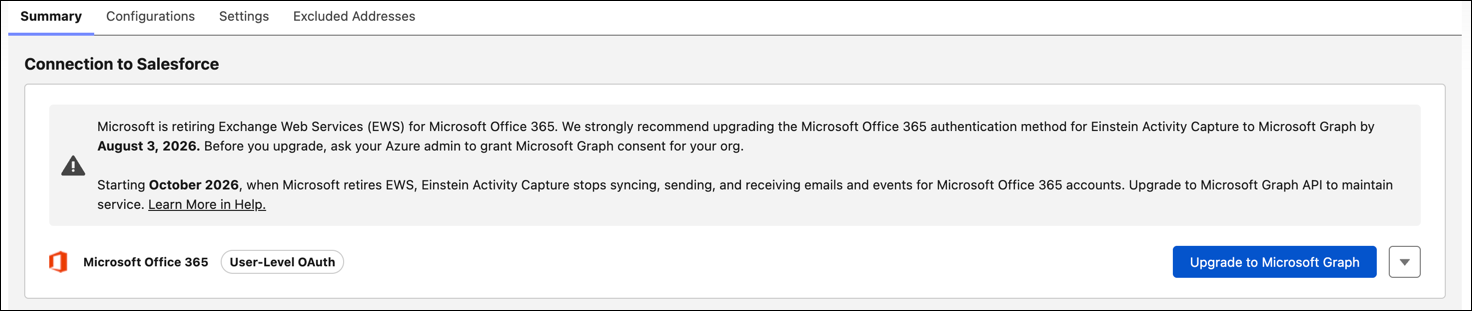
If Einstein Activity Capture is configured to use User-Level OAuth, users must reconnect to their Microsoft 365 accounts to complete the connection upgrade.
