You are here:
Bill Now
Users can manually invoice an order by selecting Bill Now on the order record and saving. It’s a useful feature when a sales rep must quickly produce an initial or final invoice. (Salesforce Billing Managed Package)
Required Editions
| Available in: Salesforce Billing 8.0 and Later |
Selecting Bill Now and saving the record triggers the invoice creation process for the order. CPQ automatically deselects Bill Now. An invoice is created if one or more products on the order meet these base requirements.
- Activated
- Next Billing Date has a value
- Hold Billing field is No or null
- Invoice Run Processing Status field is Pending Billing
- Has a tax rule that can either successfully calculate tax, or has a Taxable (Yes/No) value of No
- Has a Billing Rule
- Has a Revenue Recognition Rule
- Has a billable unit price
- Has a charge type
- Has a Billing Frequency when Charge Type isn’t equal to One-Time
- Has a start date
- Usage order products require an invoiceable usage summary
- Pending Billing Amount must be greater than 0.
Bill Now works on an inactive order if one or more order products are activated and the order meets the base requirements.
Invoices are created in Draft status.
It’s good practice to enable field tracking for Bill Now for troubleshooting and audit purposes.
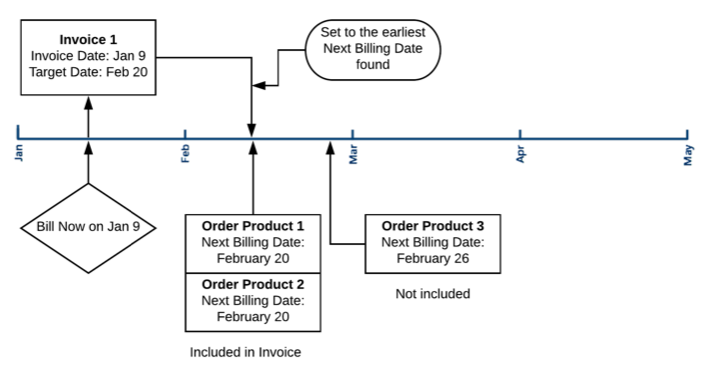
The Bill Now process sets the invoice’s target date to the earliest Next Billing Date found among invoiceable order products. Remember, order product Next Billing Dates are compared to the invoice target date to qualify the order product for inclusion on the invoice. Only order products with next billing dates on or before the target date are included as invoice lines. For more information on Next Billing Date, review Understanding Next Billing Date.

- We recommend that users don’t create workflow rules, custom triggers, or process builders that invoke the Bill Now process.
- We don’t recommend using automation to post the invoice after it’s created due to multiple updates required to create the invoice.
- Salesforce Billing can’t use Bill Now to create a single invoice from an amendment order and the original order.
- Salesforce Billing doesn't support using Bill Now in a list view to select multiple invoices.
- For Bill Now, no option is available for selecting a target date. Target date is defined by comparing the next billing dates of all order products on an order with the order’s effective date. If the minimum next billing date is earlier than the effective date, we define target date as the effective date. If the minimum next billing date is later than the effective date, target date equals the minimum next billing date.
- For invoices created from a combination of usage summary and order product records using the standard tax integration, the TaxStatus on the invoice line created from the usage summary is set to Queued. TaxStatus is updated correctly when the invoice posts or a field update is made to the draft invoice line.

Your order contains three order products: Two with a Next Billing Date of February 20, and one with a Next Billing Date of February 26. If you select Bill Now on 01/09, your invoice has a target date of February 20. The invoice contains invoice lines for your first two order products. It doesn’t contain a line for the order product with a Next Billing Date of 02/26, since that date falls after the invoice’s target date.