
You are here:
Bill Through Date Override
Manually set billing dates on your invoices to control the timing and duration of invoice generation for your customers. This feature lets you minimize the number of invoice runs you need to manage. (Salesforce Billing Managed Package)
Required Editions
| Available in: Salesforce Billing 8.0 and later |
- Bill Through Date Override
- Provide an end date for the next invoice line created from this order product. This field’s value overrides the standard End Date calculation of (last Charge To Date + Billing frequency). Salesforce Billing clears this value after the system generates the next Invoice Charge.
- Bill Through Date Override also defines the End Date of the next billing period. If the value of Bill Through Override Date is greater than the Next Charge Date and Billing frequency, Salesforce Billing creates multiple invoice lines for the order product.
For example, let’s say you had an order product where Next Billing Date and Next Charge Date were set to 4/1/17 with monthly Billing Frequency. This setup leads to four Invoice Lines.
- 04/01/17 - 04/30/17
- 05/01/17 - 05/31/17
- 06/01/17 - 06/30/17
- 07/01/17 - 07/31/17
If you change the Bill Through Date on this Order Product from null to 7/15, you'd end up with the following Invoice Lines.
- 04/01/17 - 04/30/17
- 05/01/17 - 05/31/17
- 06/01/17 - 06/30/17
- 07/01/17 - 07/15/17

If a Bill Through Date Override value extends the billing period for an order product, Salesforce Billing creates an extra invoice line and prorates it to cover the extended portion of the billing period. Consider the following order product.
- Service Desk Subscription
- Start Date: 01/01/17
- End Date: 12/31/17
- Billing Day of Month: 1
- Next Billing Date: 01/01/17
- Next Charge Date: 01/01/17
- Bill Through Date Override: None
- Billing Frequency: Quarterly
- Amount: $1200
Standard quarterly invoicing for this product would produce four invoices, each with one $300 invoice line. Let's look at what happens when a user or action changes the order product's Bill Through Date Override between the first and second billing dates.
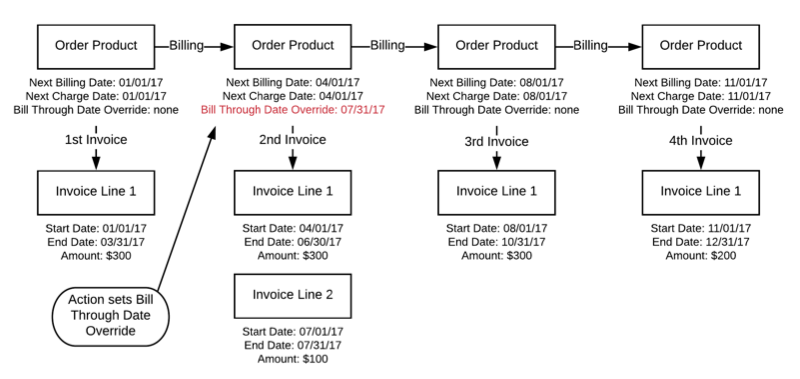
By default, the second billing period would have one invoice line with a start date of 04/01/17 and an end date of 06/30/17. However, since the Bill Through Date Override value added an extra month, we have an extra invoice line prorated to cover the extra time. This in turn moves the third billing period’s start and end dates a month later. To cover the remaining time in the order product’s year-long lifecycle, the last billing period lasts for only two months, with an invoice line that’s prorated accordingly.
By the end of the year, we’ve billed the order product for $1200 exactly as we would have if we worked with four three-month-long billing periods for $300 each. The only difference came in the total amount we billed for in the second and fourth billing period, and the number of invoice lines in the second period. These differences impact bookings and revenue recognition reporting.
Order Product: IT Support Subscription
- Billing Day of Month: 1
- Billing Frequency: Monthly
- Order Amount: 500
- Charge Type: Recurring
- Billing Type: Advance
- Next Billing Date: 3/1/2018
- Start Date: 3/1/2018
- End Date: 2/28/2019
Set the Bill Through Date Override to 5/15/2018. This date covers three billing periods: The month of March, the month of April, and a partial period containing May 1 through May 15. Since you’re billing in advance, Salesforce Billing moves the next billing date to the beginning of the final period, 5/1/2018. The invoice line for this order product contains charges March, April, and prorated charges for the partial period of 5/2 through 5/15. The next billing date of 6/1 creates an invoice line for May’s remaining partial period of 5/16 through 5/30.
If you bill in arrears, Salesforce Billing instead moves the Next Billing Date to 6/1/2018. This action creates an invoice line with charges for March, April, and May.
