Loading
Manage Your Billing Processes with Salesforce Billing
Table of Contents
Select Filters

          No results
          No results
          Here are some search tips

          Check the spelling of your keywords.
          Use more general search terms.
          Select fewer filters to broaden your search.

          Search all of Salesforce Help
          LIFO Order Product Cancellation

          LIFO Order Product Cancellation

          Salesforce CPQ allows users to create multiple amendments from an order. When the amendments reduce the value of an order product, users encounter scenarios where one order product is related to several order products through several different amendments. Sometimes, your amending order products (including the Cancel Order Product) aren't enough to completely cancel the pending balances of the original order products. In this case, Salesforce Billing uses the Cancel Order Product’s cancellation rule to determine how to cancel these pending balances. (Salesforce Billing Managed Package)

          Required Editions

          Available in: Salesforce Billing Spring ’18 and later
          Note
          Note In Salesforce Billing Summer '19, we changed the value name “LIFO based on Termination Date” to “LIFO by Order Product Creation Date.” The value's function remains the same. The new value name is available by default for users whose first Salesforce Billing install was Summer ’19 or newer. Users who upgraded from a version before Summer ’19 can change the value's name to “LIFO by Order Product Creation Date.”

          When Salesforce Billing contracts a Cancel Order Product covered by a Cancellation Rule set to any LIFO value, it performs these steps.

          1. Sum the value of terminated billing amounts for the original order products. We call this number the original balance.
          2. Sum the value of terminated billing amounts for the amending order products and the Cancel Order Products. We call this number the canceling balance.
          3. Evaluate whether the canceling balance is larger, smaller, or equal to the original balance. Remember, positive order products have negative amending order products, so Salesforce Billing ignores whether a balance is positive or negative during this evaluation.
            • If the canceling balance is larger, the Cancel Order Product reduces its pending balance by the sum of all other pending balances. All other order products reduce their pending balances to zero. Salesforce Billing picks up the Cancel Order product's remaining pending balance on the next invoice run.
            • If the canceling balance equals the original balance, Salesforce Billing reduces pending billings on all order products to zero. Since none of the order products have a pending balance, Salesforce Billing doesn't pick them up on the next invoice run.
            • If the canceling balance is smaller, Salesforce Billing determines how to allocate the canceling balance among the original and amending order products. In this case, it checks the value of the Cancel Order Product's cancellation rule. If the value is LIFO, Salesforce Billing cancels the amending order products first. It then applies the canceling balance to the original order products starting with the newest LIFO date (such as terminated date or order product creation date) and moving to the order product with the oldest LIFO date.
          Example
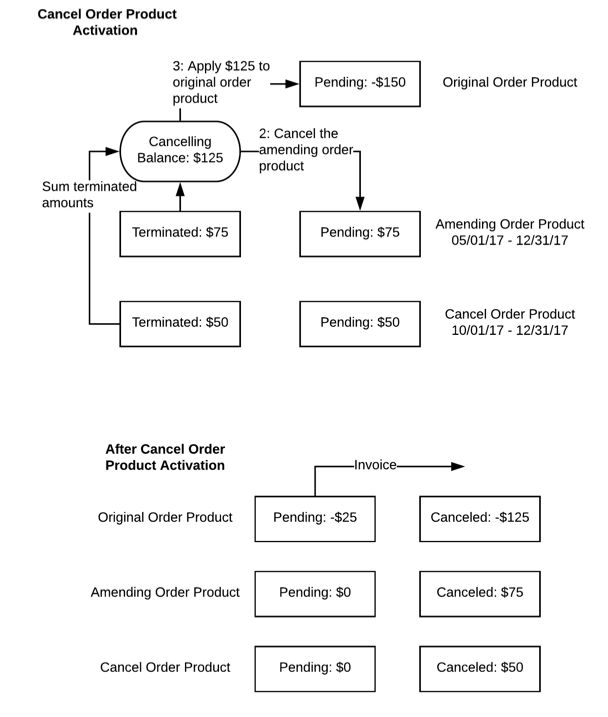
          Example Let’s look at an example of a cancel billing scenario where the amending order products can’t completely cancel the original order product. The Cancel Order Product’s Cancellation Rule has a value of LIFO based on Order Product Creation Date. So, we cancel the newest order product first in this case the amending order product. Salesforce Billing applies the US$125 canceling balance to the original order product, reducing the original order product’s pending billings to -$25, which Salesforce Billing picks up on the next invoice run. The Canceled Billing Amount fields reflect the amount canceled from each order product.

          Sample Cancel Order Walkthrough

           
          Loading
          Salesforce Help | Article