
Loading
Manage Your Billing Processes with Salesforce Billing
Table of Contents
Select Filters

          No results
          No results
          Here are some search tips

          Check the spelling of your keywords.
          Use more general search terms.
          Select fewer filters to broaden your search.

          Search all of Salesforce Help
          Salesforce Billing Hosted Card Payments in Experience Cloud Sites and Lightning Pages

          Salesforce Billing Hosted Card Payments in Experience Cloud Sites and Lightning Pages

          The force:cardPayment component, also known as the Hosted Card Payments component lets customers make payments on their accounts and save credit card information. The component is available for Experience Cloud sites and Lightning pages. When customers submit their card information, Salesforce Billing sends the request to your company’s payment gateway for processing. Because Salesforce Billing is PCI-compliant, you’re providing a secure payment process in your Experience Cloud site. (Salesforce Billing Managed Package)

          Required Editions

          Available in: Salesforce Billing Winter ’21 and later
          Important
          Important
          • Before you can access the Hosted Card Payments component in the Experience Builder or Lightning App Builder, a developer must embed the force:CardPayment code in a wrapper component. For developer instructions on coding and configuring the component, read Hosted Card Payments Lightning Component.

          The Hosted Card Payments component requires an active Enable Billing HPP Component setting in Salesforce Billing. If your org doesn’t have this setting enabled, contact Salesforce Tier 3 Support.

          Using the Hosted Card Payments Component

          Developers configure the component so that you can add it to your Experience Cloud site or Lightning page. They can also customize the component to hide certain fields, make certain fields required, and adjust labels based on your org’s payment and card saving needs.

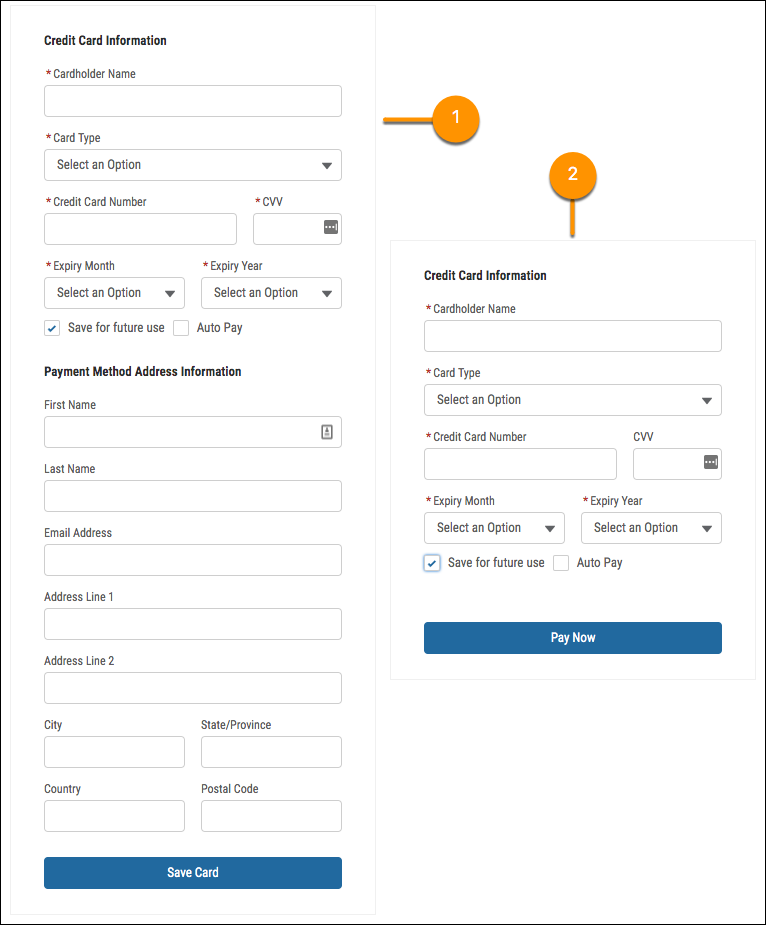
          The Card Payment component configured to save credit card and billing address information for future use (1), or to receive payments with credit card information (2nd image)

          For example, a developer can configure a component to save credit card and billing address information for future use (1). Or, they can configure it to receive payments with credit card information (2).

          Developers can also add a properties pane that lets you customize field availability, required status, and label names. To access the properties pane, select the component when building your Experience Cloud site or Lightning page. Work with your organization to determine your component’s configuration and whether you and other admins can adjust fields and labels using the pane.

          The Hosted Card Payments component sends customer payment information to Salesforce Billing, which passes the information to the payment gateway. Salesforce Billing stores the information in your org after it receives a response from the gateway. Credit card information is stored as a tokenized payment method record, while payment information is stored as a payment record.

          Payment Security and PCI Compliance

          Credit card tokenization and payments made with the Hosted Card Payments component are secured and PCI-compliant. Customizations made to the component within Salesforce are also secure and PCI-compliant. However, when using customizations outside Salesforce or using custom code, customers and partners are responsible for security and PCI compliance. For more information, see PCI Compliance in Salesforce Billing.

          Your payment gateway sends its response back to Salesforce Billing and the component, so you won’t have to handle any sensitive customer payment information directly. We’ve also provided guardrails so that customers aren’t charged more than once if they accidentally click the Pay Now button multiple times, refresh the page after sending the payment, or if there’s fraudulent activity.

          Example
          Example

          The Hosted Card Payments component can be used in many ways.

          • A customer lands on your Experience Cloud site page for your enterprise release management app. The customer fills out a form to view a demo, which creates a Salesforce lead record. The customer finishes the demo, sees the Hosted Card Payments component, and then submits credit card information to sign up for a three-month trial. After three months, the customer can opt out or continue to use that credit card for the monthly fees.
          • Your company has a phone line where customer support agents can take customer payment information to make a sale. Add the component to an account page that your customer support agents can access. The support agent can use the component to collect payment information during a customer call.
          • Set Up the Hosted Card Payments Component
            When you add the Hosted Card Payments Component to Experience Cloud sites and Lightning pages, you give your customers and partners a safe and convenient way to make payments and store credit card information. (Salesforce Billing Managed Package)
          • Guidelines for the Hosted Card Payments Component
            Review key guidelines to make sure that you get the most out of the Hosted Card Payments component. (Salesforce Billing Managed Package)
          • Permissions for the Hosted Card Payments Component
            The Hosted Card Payments component lets customers and partners save credit card information and make payments in an Experience Cloud site or Lightning page. They can use the component to when they have the proper object and field permissions. (Salesforce Billing Managed Package)
           
          Loading
          Salesforce Help | Article