Loading
Feature Disruption - Service Cloud VoiceRead More
Feature degradation | Gmail Email delivery failureRead More
Manage Your Billing Processes with Salesforce Billing
Table of Contents
Select Filters

          No results
          No results
          Here are some search tips

          Check the spelling of your keywords.
          Use more general search terms.
          Select fewer filters to broaden your search.

          Search all of Salesforce Help
          Correct Errors on Posted Credit Notes

          Correct Errors on Posted Credit Notes

          Salesforce Billing must retain a copy of all credit notes for legal and accounting purposes. To fix an error on a posted credit note, create a debit note of equal value and allocate it to each line of the original credit note. The allocation reduces the erroneous credit note’s balance to zero. You can then create and post a credit note with the correct values. (Salesforce Billing Managed Package)

          Required Editions

          Available in: All Salesforce Billing editions

          Salesforce Billing follows Generally Accepted Accounting Principles. The principles require that users must always be able to track the posting of credits, debits, payments, and refunds through a series of allocations back to a business’s general ledger. To ensure that these records are always available for legal and accounting purposes, Salesforce Billing doesn’t allow you to delete credit notes, debit notes, payments, or refunds. If you make an error, offset the erroneous record by reducing its balance to zero, and then creating a record with the correct values.

          Note
          Note You can’t change the Bill To Contact value in Posted Credit Notes. To change the Bill to Contact value, create an offsetting debit note and then create a credit note with the desired information.
          1. If the credit note has any allocated lines, unallocate them first.
          2. Create a debit note with one debit note line for each credit note line of the erroneous credit note. .
            1. From the affected account’s Debit Notes related list, click New Debit Note.
            2. Set your debit note date to the current date, and then save your changes.
            3. Go to the debit note’s Debit Note Lines related list, and click New Debit Note Line.
            4. Set the debit note line’s product to the same value as the credit note line’s product.
            5. Set the debit note line’s subtotal to the same value as the credit note line’s balance, and then save your changes.
              We recommend that you add a note explaining that you created this debit note line to offset a credit note line created in error.
            6. Repeat steps A through E for each credit note line of the credit note.
            7. Change your debit note’s status to Posted.
          3. Allocate each debit note line to the equivalent credit note line.
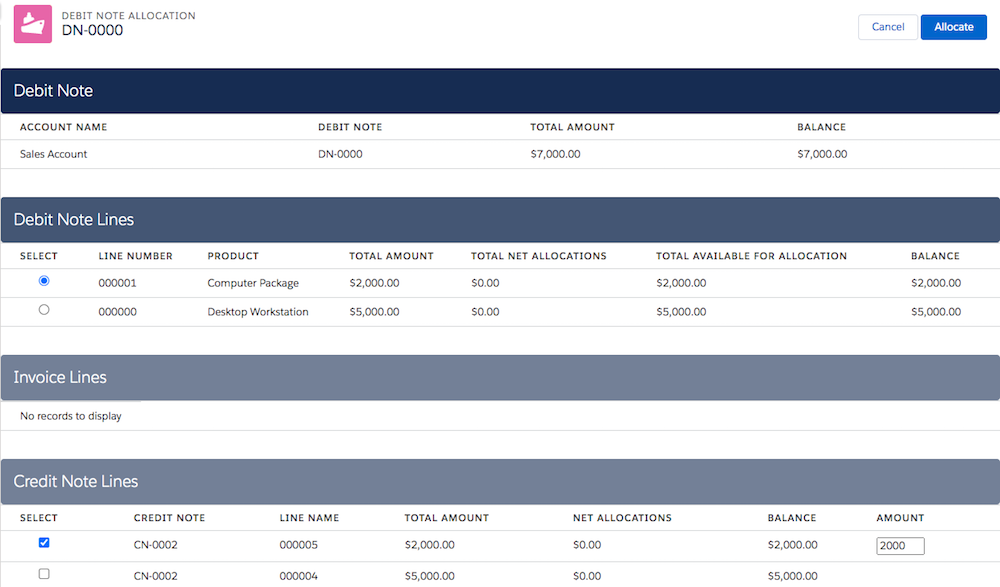
            1. From the debit note’s detail page, click Allocate.
            2. Select your debit note line, and then select the credit note containing an equal balance.
            3. On the credit note line, enter an amount equal to the debit note line’s balance, and then click Allocate. Confirm that the credit note line now has a balance of 0.
            4. Repeat steps B and C for each of the erroneous credit note’s credit note lines.
              After you offset all the credit note lines, the credit note has a balance of 0.
          4. To return to your debit note detail page, click Cancel.
            Clicking Cancel doesn’t cancel any of the allocations that you made.
          Example
          Example In this example, a user must offset an erroneous credit note containing two credit note lines. They created a debit note containing two debit note lines each of which matches the balance of a credit note line. They first allocate debit note line 1 to credit note line 5, and then allocate debit note line 0 to credit note line 4.

          A debit note containing two debit note lines, one for $2000 and another for $5000. The user will allocate the $2000 debit note line to a $2000 credit note line, and allocate the second debit note line to the $5000 credit note line.

           
          Loading
          Salesforce Help | Article