
You are here:
Dynamic Invoice Plans
Define an invoicing plan with custom amounts and billing frequencies. (Salesforce Billing Managed Package)
Required Editions
| Available in: Salesforce Billing Spring ’18 and later |
Many customers have invoicing needs based on milestones or project acceptance. These workflows require customized invoicing dates that don’t follow standard billing frequencies such as monthly or quarterly invoicing. You may also need to define amounts to invoice that vary based on certain criteria. For example, you could bill 10% of an order product’s amount for the first billing transaction. You could then bill 25% when the first delivery occurs, and the remainder after the final delivery.
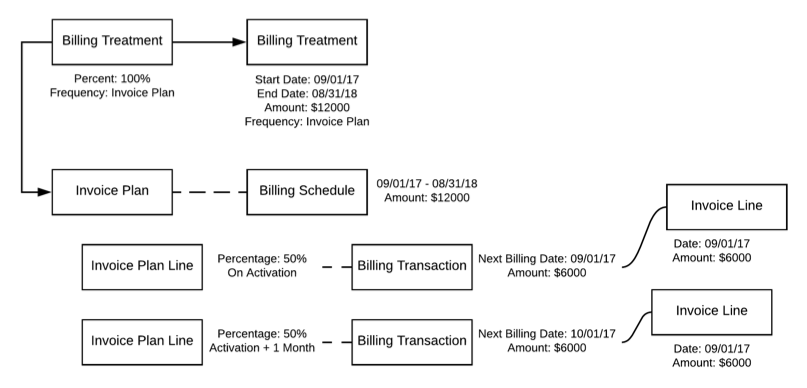
Salesforce Billing lets you define a customized invoicing process using the Invoice Plan object, which contains invoice plan lines. You can define a lookup to an invoice plan on a billing treatment. When you invoice an order product with a Billing Frequency field set to Invoice Plan, Salesforce Billing checks the invoice plan referenced on your order product’s billing treatment. It then associates that invoice plan with your order product.
Your invoice plan contains invoice plan lines, which specify the custom behavior for one invoice transaction. You can define whether you want to bill an order product based on a percentage or remainder of its total amount. You can also define when Salesforce Billing can invoice the order product and provide a custom service period when applicable. The Processing Order field defines the order in which Salesforce Billing applies the lines of an invoice plan to the targeted order product.

- Dynamic invoice plans don't support amendments.
- Dynamic invoice plans don't support flat amount invoice plan lines.
- Dynamic invoice plans don't support changing the billing frequency from Invoice Plan to a recurring value, such as Monthly, after order product activation. Recurring billing frequencies can't be changed to Invoice Plan after order product activation. If you want to make such a change, deactivate the order product first, update the billing frequency, and then activate the order product.
- Invoice plan order products don't populate their Pending Billing Amount (without tax) field.
- Invoice lines created from invoice plan lines don’t calculate unit price. Unit price is assigned from the Billing Transaction total.
Billing Schedules and Billing Transactions
Billing schedules and transactions define how Salesforce Billing invoices an order product. When you invoice an order product with an invoice plan-driven billing frequency, Salesforce Billing creates a billing schedule that contains billing transaction records for each invoice plan line. A billing transaction displays how much you’ve billed based on the relationship between the invoice plan line’s commencement date and your order product’s start and end dates. The billing schedule record displays the total amount that has been billed for that order product based on all the related invoice plan lines.

For example, let’s say you have a recurring order product with a value of $1000. The order product is tied to an invoice plan that bills 20% one month after order product activation and the remainder two months after activation. When you invoice after one month, your invoice plan produces a billing schedule with two billing transactions. The first billing transaction has an amount of $200 and the second billing transaction has an amount of $800. However, since you haven’t hit the second month of billing, your second invoice transaction has a status of Pending and an Amount To Be Billed of $800. Your billing schedule reflects this data with a Billed Amount field of $200. When you invoice again after two months, your second billing transaction accounts for the remaining $800.
Your invoice contains an invoice line for each billing transaction with a status of Billed.

- A 20% invoice after the first 10 days
- A 50% invoice after the first month
- An invoice covering the remainder of your fees after six months.
| Name | Total Price | Start Date | End Date | Next Billing Date |
|---|---|---|---|---|
| Project Customization | $1200 | 01/01/2018 | 12/31/2018 | 05/20/2018 |
You can create an invoice plan to manage this invoicing process. Start off with an active invoice plan that creates billing schedules upon order product activation. Next, make your invoice lines. All your lines should commence and begin their service periods upon order product creation, and have their Service Period End fields set to Create Without Date.
| Name | Type | Percentage | Commencement Date Offset | Commencement Date Offset Units | Processing Order |
|---|---|---|---|---|---|
| 20 Percent | Percent | 20% | 10 | Days | 1 |
| 50 Percent | Percent | 50% | 1 | Months | 2 |
| Remainder | none | none | 6 | Months | 3 |
You invoice your order on 03/31/2018. Your invoice plan produces a billing schedule with three billing transactions. Since you haven’t passed the sixth month yet, only the first two billing transactions in your schedule are billed.
| Name | Status | Amount | Amount To Be Billed | Invoice Plan Line | Invoice Line |
|---|---|---|---|---|---|
| 20 Percent | Billed | $240 | $240 | 20 Percent | Invoice line is created |
| 50 Percent | Billed | $600 | $600 | 50 Percent | Invoice line is created |
| Remainder | Pending | $360 | $360 | Remainder | Invoice line isn’t created |
- Create an Invoice Plan and Billing Treatment Setup
Create an invoice plan and associate it with a billing treatment. (Salesforce Billing Managed Package) - Milestone Billing
Use invoice plans to invoice your customers in response to milestones. A milestone is a scheduled event that includes the completion of a major deliverable. (Salesforce Billing Managed Package) - Weekly Billing with Invoice Plans
Use invoice plans to invoice your customers based on weekly schedules. (Salesforce Billing Managed Package) - Invoice Plans for Custom Billing Frequencies
Use invoice plans to create billing schedules that don’t follow standard billing frequencies such as monthly or quarterly. For example, you could make your first transaction ten days after the sale, and your second transaction two months after that. (Salesforce Billing Managed Package) - Override Billing Transactions
You can override the target date and amount on your billing transactions. This feature is useful in milestone billing if a sales rep renegotiated terms and changes an invoicing setup that you already created. (Salesforce Billing Managed Package) - Canceling Order Products with Invoice Plans
If your billing treatment looks up to a new order invoice plan, it also requires a cancellation invoice plan. When you cancel an order product covered by a billing treatment with these two lookups, Salesforce Billing makes a billing schedule and billing transactions based on your cancellation invoice plan. (Salesforce Billing Managed Package)
