
You are here:
Get Started with Finance Logging
Finance transactions show details about any type of financial action performed in your Salesforce org. Finance balance snapshots show the state of a header-level financial object's financially significant values following an action. Use Salesforce and Tableau reports to track important financial information and address aging or bad debt circumstances across all the records affected by a financial action. (Salesforce Billing Managed Package)
Required Editions
| Available in: Salesforce Billing Winter ’21 and later |
A finance transaction contains a collection of fields to describe the state of a record following a financial action. Financial actions include actions such as posting an invoice or allocating a payment to an invoice line. The transaction’s fields track important financial information such as amounts and the resulting balance following the action. We recommend creating one finance transaction for each record created or changed as a result of the action. For example, let’s say you posted an invoice with two invoice lines. You can create one finance transaction for the invoice, one for the first invoice line, and one for the second invoice line.
The record that a financial transaction tracks is called the reference entity. When you create a finance transaction, you update the transaction's subtotal, tax amount, and total amount with tax fields to show values from the reference entity's same fields. The transaction's Charge Amount, Impact Amount, and Resulting Balance fields let you show the results of the financial action.
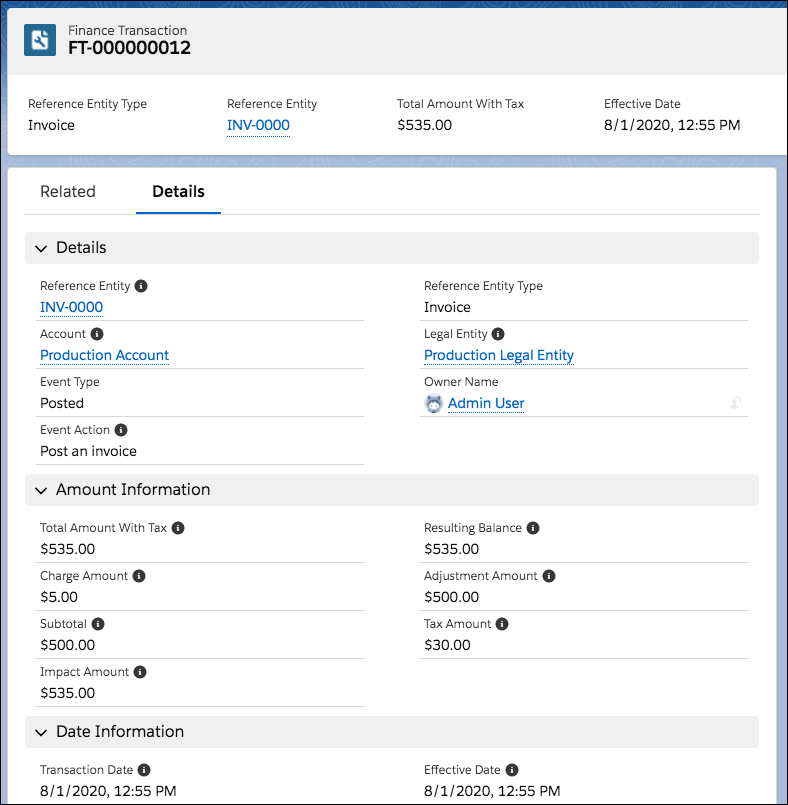
In this sample, a vendor created a finance transaction to represent the posting of an invoice. The invoice has a total balance of $500 with 6% tax applied. The invoiced product also contained a 10% pretax service charge, which the user has noted in the Charge Amount field.
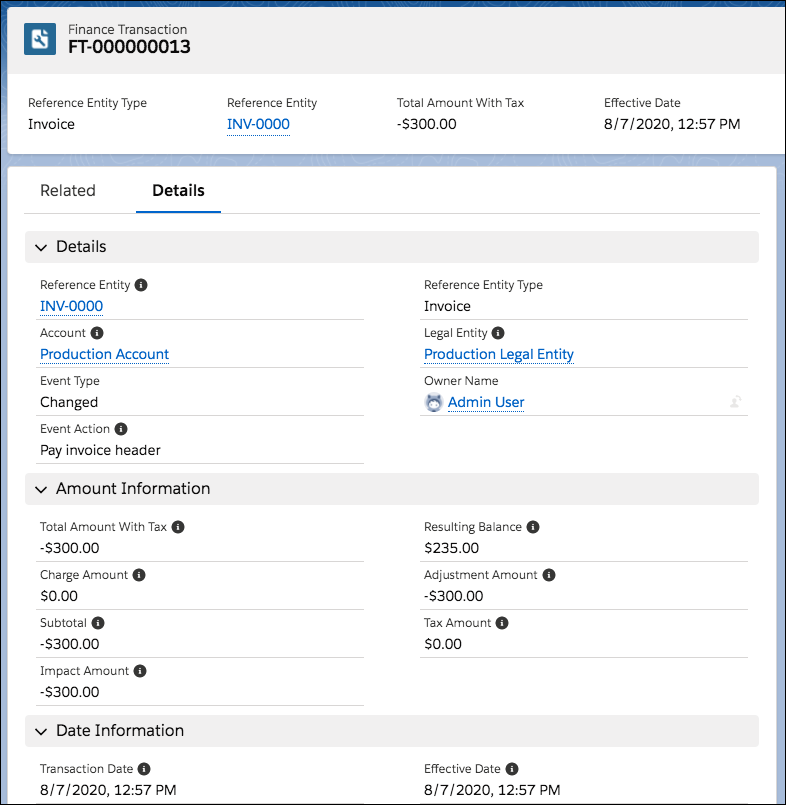
Later, a customer makes a $300 payment against the invoice header. The vendor creates another finance transaction to represent the invoice’s state following the payment.
When you save a finance transaction related to an invoice, payment, refund, credit memo, or debit memo, Salesforce Billing creates a finance balance snapshot. The snapshot represents the balances of a header-level financial record following a financial action. Most of its fields inherit their values from the same fields on the parent finance transaction. The snapshot’s Balance field inherits its value from the finance transaction’s Resulting Balance field.
Reporting on Finance Balance Snapshots
Finance balance snapshots provide a convenient way to track changes to header-level financial objects over time. We recommend running reports to view groups of finance balance snapshots filtered by values such as account, reference entity, and created date. This process allows you to track the changes made to important financial records over their lifecycle. For example, let’s say the vendor provided a $50 credit to the customer’s invoice. You want to track all the changes made to your invoice in your billing period of 08/10/20 through 09/09 20, so you run a report. The report lets you view history of your invoice following each financial action in the billing period.



On 03/01/20, you post an invoice that contains a $77 invoice line and a $33 invoice line. In this case, you make one transaction to represent the posted invoice, and one transaction for each of the posted invoice lines.
| Transaction Name | Reference Entity | Reference Entity Type | Subtotal | Total Amount with Tax | Resulting Balance | Event Type | Event Action |
|---|---|---|---|---|---|---|---|
| FT-03 | IL-02 | Invoice Line | $30.00 | $33.00 | $33.00 | Posted | Post an Invoice |
| FT-02 | IL-01 | Invoice Line | $70.00 | $77.00 | $77.00 | Posted | Post an Invoice |
| FT-01 | INV-01 | Invoice | $100.00 | $110.00 | $110.00 | Posted | Post an Invoice |
When you save FT-01, Salesforce Billing creates a finance balance snapshot for your invoice.
| Snapshot Name | Transaction Name | Balance | Reference Entity | Reference Entity Type | Subtotal | Total Amount with Tax | Event Type |
|---|---|---|---|---|---|---|---|
| FBS-01 | FT-01 | $110 | INV-01 | Invoice | $100 | $110 | Posted |
On 03/10/20, a customer makes a payment of $77.00 against the first invoice line. In this case, we add four transactions to represent changes following the action of paying the invoice:
- FT-04 represents the reduction of the payment's balance.
- FT-05 represents allocating the payment to the invoice line.
- FT-06 represents the reduction of the invoice line's balance.
- FT-07 represents the reduction of the invoice's balance.
| Transaction Name | Reference Entity Type | Source Entity | Destination Entity | Subtotal | Total Amount with Tax | Impact Amount | Resulting Balance | Event Type | Event Action |
|---|---|---|---|---|---|---|---|---|---|
| FT-07 | Invoice | null | null | $100 | $110 | $110 | $33.00 | Allocated | Pay Invoice Line |
| FT-06 | Invoice Line | null | null | $70.00 | $77 | $77 | $0 | Allocated | Pay Invoice Line |
| FT-05 | Payment Invoice Line Application | P-01 | IL-01 | null | $77 | -$77 | null | Allocated | Pay Invoice Line |
| FT-04 | Payment | null | null | $100 | $110 | $110 | $110 | Allocated | Pay Invoice Line |
When you save FT-04 and FT-07, Salesforce Billing creates two more snapshots. Notice that we can now compare the state of the invoice after posting (FBS-01) and the state of the invoice after payment application (FBS-03).
| Snapshot Name | Transaction Name | Balance | Reference Entity | Reference Entity Type | Subtotal | Total Amount with Tax | Impact Amount | Event Type |
|---|---|---|---|---|---|---|---|---|
| FBS-03 | FT-07 | $33 | INV-01 | Invoice | $100 | $10 | $110 | Allocated |
| FBS-02 | FT-04 | $0 | P-01 | Payment | null | $77 | -$77 | Allocated |
| FBS-01 | FT-01 | $110 | INV-01 | Invoice | $100 | $10 | $110 | Posted |
Next, your customer issues a credit of $22 against your second invoice line, reducing its balance to $11. For this action, you need five new finance transactions to represent the action of crediting the invoice line: Three entities represent the newly created credit memo, credit memo line, and credit memo invoice line application respectively. The other two represent our original invoice and $33 invoice line following the credit application.
- FT-08 represents the creation of the credit memo.
- FT-09 represents the creation of the credit memo line.
- FT-10 represents the application of the credit memo to the invoice line.
- FT-11 represents the reduction of the invoice line's balance.
- FT-12 represents the reduction of the invoice's balance.
| Transaction Name | Reference Entity | Reference Entity Type | Source Entity | Destination Entity | Subtotal | Total Amount with Tax | Impact Amount | Resulting Balance | Event Type | Event Action |
|---|---|---|---|---|---|---|---|---|---|---|
| FT-12 | INV-01 | Invoice | null | null | $100 | $110 | $110 | $11 | Allocated | Credit Invoice Line |
| FT-11 | IL-02 | Invoice Line | null | null | $30 | $33 | $33 | $11 | Allocated | Credit Invoice Line |
| FT-10 | CMLA-01 | Credit Memo Invoice Line Application | CM-01 | IL-02 | null | $22 | -$22 | $0 | Allocated | Credit Invoice Line |
| FT-9 | CML-01 | Credit Memo Line | null | null | $20 | $22 | -$22 | $0 | Allocated | Credit Invoice Line |
| FT-8 | CM-01 | Credit Memo | null | null | $20 | $22 | -$22 | $0 | Allocated | Credit Invoice Line |
When you save FT-08 and FT-12, Salesforce Billing creates a snapshot to represent the posted credit memo (FBS-04). It also creates a snapshot to represent the invoice following the credit memo application. Viewing all five balance snapshots together lets us understand the financial changes made to our invoice across its lifecycle, and the objects that contributed to those changes.
| Snapshot Name | Transaction Name | Balance | Reference Entity | Reference Entity Type | Subtotal | Total Amount with Tax | Impact Amount | Event Type |
|---|---|---|---|---|---|---|---|---|
| FBS-05 | FT-12 | $11 | INV-01 | Invoice | $100 | $110 | $110 | Allocated |
| FBS-04 | FT-11 | $0 | CM-01 | Credit Memo | $20 | $22 | -$22 | Allocated |
| FBS-03 | FT-07 | $33 | INV-01 | Invoice | $100 | $110 | $110 | Allocated |
| FBS-02 | FT-04 | $0 | P-01 | Payment | null | $77 | -$77 | Allocated |
| FBS-01 | FT-01 | $110 | INV-01 | Invoice | $100 | $110 | $110 | Posted |

