Loading
Manage Your Billing Processes with Salesforce Billing
Table of Contents
Select Filters

          No results
          No results
          Here are some search tips

          Check the spelling of your keywords.
          Use more general search terms.
          Select fewer filters to broaden your search.

          Search all of Salesforce Help
          Managing Finance Period Errors

          Managing Finance Period Errors

          If Salesforce Billing encounters validation errors while closing or reopening a finance period, we show error logs with detailed information on why each error happened. You can access the logs on the finance period and on each of its revenue transactions where an occurred. Review the logs to determine what corrective action to take to close or reopen your finance period. (Salesforce Billing Managed Package)

          Required Editions

          Available in: Salesforce Billing Summer ’20 and later

          When a user or process closes or reopens a finance period, Salesforce Billing runs validations to ensure the finance period and its revenue transactions are properly configured. During this process, the finance period’s Period Status field changes to Pending Closed or Pending Open. If the finance period or any of its revenue transactions encounter validation errors, Salesforce Billing sets the finance period’s status to Error. It then creates one error log for each error. You can find each log in the Error Logs related list on the finance period and revenue transaction objects.

          Tip
          Tip Add the Status field to the fields that show on the Revenue Transactions related list on your finance period page layout. That way, you can quickly find which transaction wasn’t able to open or close, and then view its Error Log.

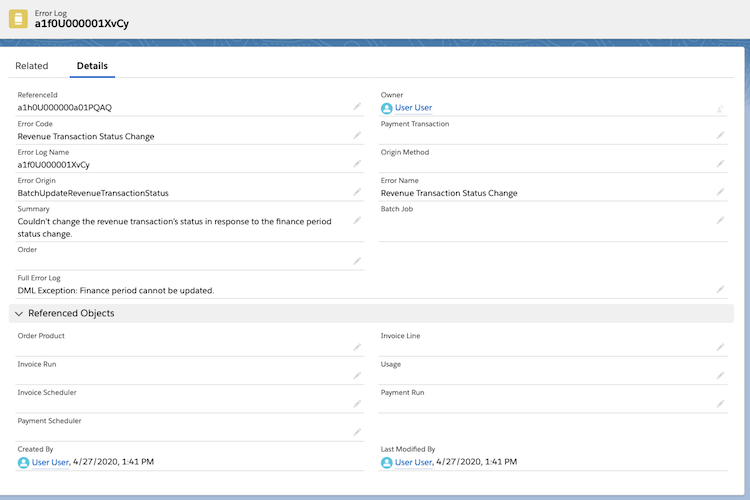
          Let’s review some important error log fields.

          Error Origin
          The Salesforce Billing service that encountered the error
          Full Error Log
          A detailed description of the error
          ReferenceId
          The ID of the record where the error occurred
          Summary
          A summarized description of the error, and steps for correction

          When you’ve finished reviewing your error logs and made the appropriate corrections, change your finance period’s status from Error to your original attempted value.

          Example
          Example

          An example of an error log. The summary indicates that Salesforce Billing couldn't change the revenue transaction's status inr esponse to the finance period's status change.

           
          Loading
          Salesforce Help | Article