You are here:
Indeterminate and Failed Transactions
An indeterminate transaction occurs when Salesforce Billing is unable to process the results of the gateway’s call to the customer’s bank. Depending on the type of issue that prevented communication, the transaction may or may not be successful. When you see indeterminate payment transactions in Salesforce Billing, first review your external payment gateway to determine whether the transaction was created. Then, you have several options for either recording a successful transaction on your own in Salesforce Billing, or making corrections and retrying the transaction. (Salesforce Billing Managed Package)
When Salesforce Billing sets a payment transaction’s gateway status to Indeterminate, it also changes the value of related invoice’s Corrective Action (Payment Run) field to Action Required. As long as the Action Required value is active, payment runs don’t evaluate the invoice for payment. We’ve configured invoices this way so that there’s no risk of Salesforce Billing charging a customer twice with future payment runs before you figure out whether the transaction was successful. We consider an invoice with Action Required to be “locked.” To unlock a locked invoice, click Attempt Refund and Unlock Invoice on the payment transaction record. We'll cover more information on the Attempt Refund and Unlock Invoice button later.
When you’re trying to match an indeterminate transaction from Salesforce Billing with its equivalent in the gateway, we recommend searching by matching values. For example, you could search by matching account numbers, routing numbers and transaction amounts. You can also search by instances where the payment transaction’s Gateway Date field matches the date and time that the transaction was recorded in the gateway.
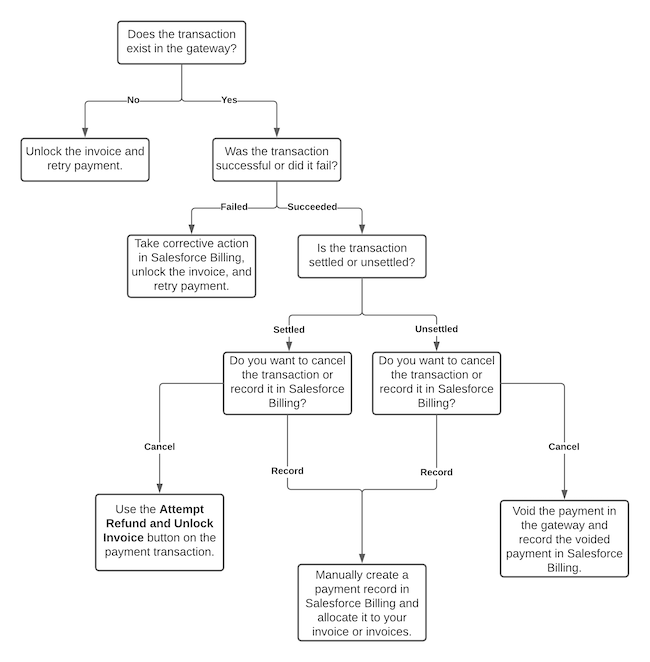
In some cases, such as the payment request call failing, your transaction won’t exist in the gateway. In this case, unlock the invoice so that it’s available for future payment attempts.
If the transaction exists in the gateway but failed with the customer’s bank, correct the issues with the payment, then unlock the invoice.
If the transaction was successful and exists in the gateway, check whether the transaction is settled or unsettled. An unsettled transaction hasn’t been processed by the customer’s bank yet. In most cases, the bank processes an unsettled transaction at a predetermined time, such as the end of a business day. Settled transactions have been processed by the customer bank.
For successful transactions, you need to decide if you want to create a payment and manually allocate it in Salesforce Billing, or if you want to cancel the payment. If you want to cancel the transaction, your steps vary based on whether the transaction is unsettled or settled:
- Unsettled transactions can’t be refunded because they haven’t been applied to the customer’s bank yet. Instead, follow your payment gateway provider’s directions to void the transaction. Later, you’ll need to record the voided transaction in Salesforce Billing.
- Settled transactions must be refunded.
If you want to record a successful transaction, create an equivalent payment in Salesforce Billing as a child of the indeterminate payment transaction, then allocate the payment to the target invoice. For example, if your indeterminate transaction had a balance of $1000, go to the transaction’s Payment related list, create a payment for $1000, and then allocate it your invoice.