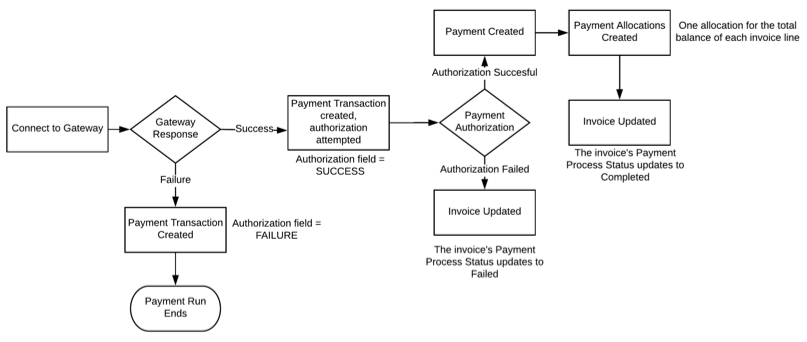
When a payment run finishes selecting invoices, it begins processing each invoice for
payment. The payment evaluation process consists of several steps. (Salesforce Billing Managed Package)
Required Editions
Available in: All Salesforce Billing Editions
For each invoice included in a payment run, Salesforce Billing performs the following steps.
Sets invoice’s payment run ID to the ID of the current payment run, and then updates the
invoice’s payment run processing message based on the most recently completed payment run batch
action.
Sends a transaction request to the account’s external payment gateway, and then creates a
payment transaction to record the response.
If the gateway authorization is successful, waits for the payment gateway to send a
response, and then records it in the payment transaction.
If the response was successful, creates a payment with a balance equal to the invoice’s
balance. Changes the payment transaction’s Authorization field to SUCCESS.
If the response failed or was indeterminate, logs the response details in the payment
transaction. Users can take corrective action based on the type of failed or indeterminate
response.
For successful payment transactions, attempts to create a payment and allocate it to the
target invoice.
If Advanced AR Application is enabled in Salesforce Billing package settings, allocates
the payment to the target invoice’s invoice lines.
If Advanced AR Application is disabled, allocate the payment to the target invoice’s
invoice header.
After the payment run finishes evaluating all eligible invoices, it updates the following
fields on the payment run detail page.
Invoices Processed
Successful Transactions
Total Payments Processed
Completed Time
Status
Did this article solve your issue?
Let us know so we can improve!
Loading
Salesforce Help | Article
Cookie Consent Manager
General Information
Required Cookies
Functional Cookies
Advertising Cookies
General Information
We use three kinds of cookies on our websites: required, functional, and advertising. You can choose whether functional and advertising cookies apply. Click on the different cookie categories to find out more about each category and to change the default settings.
Privacy Statement
Required Cookies
Always Active
Required cookies are necessary for basic website functionality. Some examples include: session cookies needed to transmit the website, authentication cookies, and security cookies.
Functional Cookies
Functional cookies enhance functions, performance, and services on the website. Some examples include: cookies used to analyze site traffic, cookies used for market research, and cookies used to display advertising that is not directed to a particular individual.
Advertising Cookies
Advertising cookies track activity across websites in order to understand a viewer’s interests, and direct them specific marketing. Some examples include: cookies used for remarketing, or interest-based advertising.