
You are here:
Payments and Credits
Collect payments against posted invoices. Salesforce Billing lets you manually collect and allocate payments or automate the payment process. You can then post the payment to keep your books up-to-date. (Salesforce Billing Managed Package)
Required Editions

| Available in: All Salesforce Billing Editions |
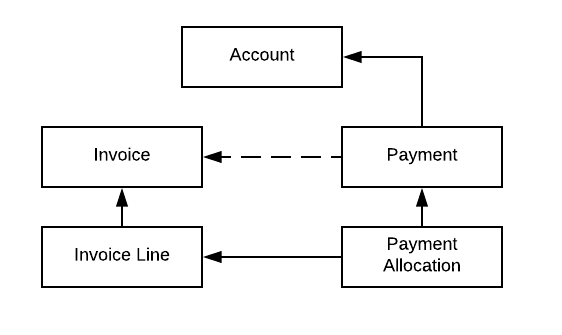
Salesforce Billing tracks payments using several objects. The first of these is the Payment object, a financial record that represents a “payment event,” such as receiving a check or credit card information. A payment record stores information about the amount of the payment, the payment type, and a lookup to the account where the payment can be applied. Users can apply payments to any posted invoice with a balance on the selected account.
Salesforce Billing allows for three ways to create payments.
- Accounts Receivable users can manually create a payment record.
- Admins can create a payment run that evaluates posted invoices on scheduled intervals. It then makes payments based on the related account’s payment method.
- End customers can enter the Salesforce Billing payment center to pay invoices using their own payment methods.
Salesforce Billing creates a payment record once it receives customer funds through the payment scheduler or the payment center. The payment record’s Payment Status field changes from Initiated to Completed once Salesforce Billing verifies the funds. After verification, funds can be applied to one or more invoices. Applying a full payment to an invoice moves the invoice’s Status from Active or Overdue to Paid.
Payments also have a related list for payment allocation records. These records define the amount of a payment that has been allocated to a given invoice line.
Admins can also import payments via the Data Loader or manual entry. Some enterprises require manual payment entries when processing large amounts of checks through a lockbox service or when mailed directly to the enterprise. You can convert this check information to .CSV file format and then import it via the Salesforce data-loading process. A payment has a master-detail relationship to an account.

Payments have an optional lookup to an invoice record. Users often add this lookup if the payment is intended for one invoice, though it is not required.
- Payment Methods
Payment methods store Automated Clearning House (ACH) or credit card details for a customer, and the payment gateway that accepts payments. You can use these details in scheduled or one-time payment scenarios. (Salesforce Billing Managed Package) - Processing Payments
Salesforce Billing provides a comprehensive system for taking customer payment information and passing it to the customer’s bank. You can schedule payment runs that evaluate unsettled invoices and automate payments against them, or use the Payment Center to apply payments on your own. When the customer bank responds to a payment request, several Salesforce Billing objects and fields let you track the responses and take corrective action against unsuccessful requests. (Salesforce Billing Managed Package) - Payment Allocations
A payment allocation represents the amount of a payment that has been applied to an invoice line’s balance. Users can manage allocations in Salesforce Billing’s Payment Allocation page. (Salesforce Billing Managed Package) - Issuing Credits
Credit notes allow you to allocate a negative balance change to an invoice line. This feature is useful for adjusting errors in unpaid or partially paid invoices. You can also provide credit to a user account and then allocate that credit to decrease the balance of their invoices at a later date. Finally, credit notes provide accurate and complete recordkeeping of the transactions that occur after an invoice has been posted. (Salesforce Billing Managed Package) - Creating Debits and Add-on Charges
Debit notes allow you to allocate a positive balance change to an invoice line or positive credit note line. This feature is useful if you must change a line’s balance after invoice generation, such as applying a late fee. (Salesforce Billing Managed Package) - Applying Refunds
Refund customers accurately and efficiently with Salesforce Billing. You can provide a refund when a customer wants to cancel or change their invoiced order products. (Salesforce Billing Managed Package) - Payment Data Model
When you’re working with payment objects in Salesforce Billing, review important object relationships. (Salesforce Billing Managed Package)
